
Law Firm SOP Templates.
Ready-to-use systems for running a small law firm, from the first referral to the closed file. Open any of them free. No login needed.
The approach Crow Estate Planning used to document probate across 95 counties.
Watch
Mapping a law firm's client flow, live
Steve Riley has coached law firm owners for more than 20 years, after building and selling his own practice. He is now an advisor at Atticus. In this episode he and Dave pull up a blank Critical Client Flow and fill it in for a law firm, stage by stage.
His first question is not what kind of law you practise. It is how you get paid.
They get the doing of the law confused with the business of the law.

The Critical Client Flow
Your whole firm on one page
This is the flow Steve and Dave built on the call. Every matter moves through the same handful of stages, and the stage where work stalls is where your first system belongs.
- Start with how you get paid. Contingency, fixed fee or hourly. The pricing model shapes the flow far more than the area of law does.
- Referrals are two pipelines, not one. Other professionals and past clients are fed in different ways, so they need separate systems.
- Intake does not need the lawyer. A trained team member runs the first consult on a script. The lawyer signs off on taking the case.
Where to start
Don't document everything
Most firms need four or five systems in place before the habit shifts from asking the owner to checking the system. If you only ever do three, do the three that carry the most risk.
Law firm SOP templates, by department
Each one is a full standard operating procedure: what triggers it, who does it, the steps, the templates and how you know it is done. They are written for a US probate practice of around 6 to 15 people. The client flow systems are specific to probate; the practice systems fit most small firms. Anything your state decides, such as deadlines, forms, fees and trust account rules, is left as a highlighted gap for your firm to fill in. That is deliberate.
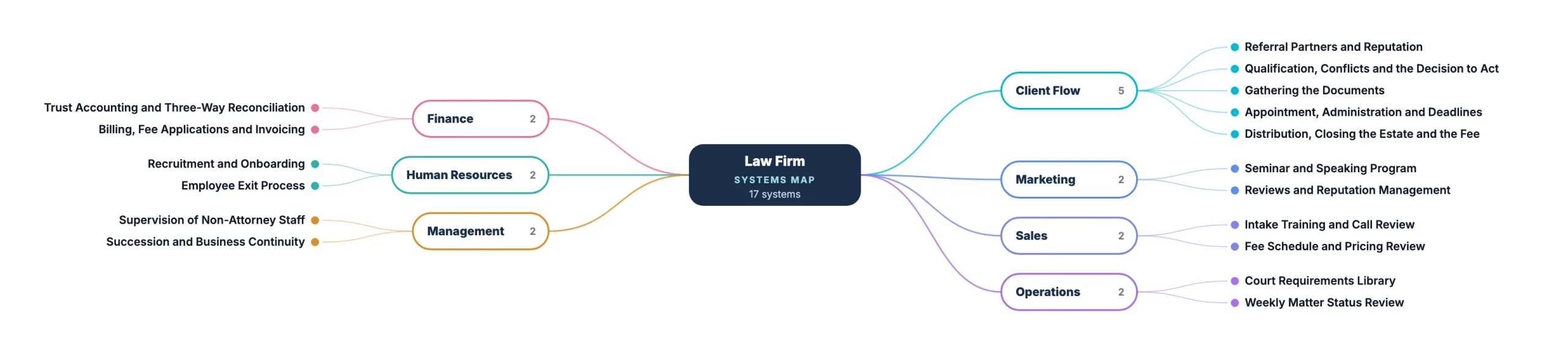
The Matter
The client flow, from the first referral to the closed estate.
Referral Partners and Reputation
Keep probate work arriving through the people who recommend you, without chasing it.
Open the system → Opens in systemHUB. No login needed.Qualification, Conflicts and the Decision to Act
Conflicts run before the meeting, facts gathered on a script, and the attorney decides before anything is sent.
Open the system → Opens in systemHUB. No login needed.Gathering the Documents
Get the original will, the certificates and the asset picture from a grieving family without losing three months.
Open the system → Opens in systemHUB. No login needed.Appointment, Administration and Deadlines
Every deadline that runs from the date Letters issue, on one register reviewed daily.
Open the system → Opens in systemHUB. No login needed.Distribution, Closing the Estate and the Fee
Distribute against receipts, get discharged, get paid, close the file, then ask for the referral.
Open the system → Opens in systemHUB. No login needed.Also in the full pack (get them with a free trial): Inquiry: Responding to the Introduction · Engagement and Retainer · Handoff to the Case Manager · Petition, Review and Filing
Marketing
Getting in front of the people who send you work.
Seminar and Speaking Program
Turn an hour in front of referral partners or a community group into matters.
Open the system → Opens in systemHUB. No login needed.Reviews and Reputation Management
Ask for reviews at the right moment, and answer a bad one without breaching confidentiality.
Open the system → Opens in systemHUB. No login needed.Also in the full pack (get them with a free trial): Advertising and Marketing Compliance Review · Client Education Library · Website and Google Business Profile
Sales
Turning an introduction into a signed engagement.
Intake Training and Call Review
Keep non-attorney intake staff sharp on the line they cannot cross, by reviewing real calls.
Open the system → Opens in systemHUB. No login needed.Fee Schedule and Pricing Review
Quote from a published schedule instead of pricing every matter from scratch.
Open the system → Opens in systemHUB. No login needed.Also in the full pack (get them with a free trial): Estate Planning Conversion · Matter Pipeline Tracking
Operations
Keeping every open matter moving.
Court Requirements Library
A living checklist per county of what that court actually wants: forms, fees, copies and local practice.
Open the system → Opens in systemHUB. No login needed.Weekly Matter Status Review
Catch the matters that have quietly stopped moving before the client calls to ask.
Open the system → Opens in systemHUB. No login needed.Also in the full pack (get them with a free trial): Client Communication Standards · Conflicts Database Maintenance · Records, Retention and the Original Wills Register · Systems, Access and Information Security
Finance
Client money and the firm's own money, kept apart.
Trust Accounting and Three-Way Reconciliation
Client money never mixed, never short, and reconciled three ways every month.
Open the system → Opens in systemHUB. No login needed.Billing, Fee Applications and Invoicing
Get the fee recorded, approved where the court requires it, invoiced clearly and collected.
Open the system → Opens in systemHUB. No login needed.Also in the full pack (get them with a free trial): Accounts Payable and Estate Disbursements · Monthly Financial Review and Forecasting · Payroll Processing · Tax and Compliance Calendar
Human Resources
Hiring well and letting go cleanly.
Recruitment and Onboarding
Hire into a small firm and get a new non-attorney productive, safely and quickly.
Open the system → Opens in systemHUB. No login needed.Employee Exit Process
Matters handed over, access removed the day they leave, and final pay right.
Open the system → Opens in systemHUB. No login needed.Also in the full pack (get them with a free trial): HR Compliance · Leave and Time Management · Performance Reviews
Management
The structure that lets the attorney step back.
Supervision of Non-Attorney Staff
Who supervises whom, what gets reviewed, and what is never delegated.
Open the system → Opens in systemHUB. No login needed.Succession and Business Continuity
What happens to open matters and client money if the attorney is suddenly unavailable.
Open the system → Opens in systemHUB. No login needed.Also in the full pack (get them with a free trial): KPI Tracking and Scorecards · Risk, Ethics and Malpractice Oversight · Strategic Planning · Team Meeting Rhythms
Case study
95 counties, 95 sets of rules, one source of truth
John Crow wanted to grow Crow Estate Planning and Probate across the Southeast US. Probate made that hard: every county does it differently.
He appointed Callie Saulsburry, an educator by background, as Systems Champion. They documented the simpler estate planning flow first, then used the same approach on probate, one county at a time. The team now asks for new systems instead of resisting them.
Not sure where to start?
Answer six questions about your practice and get the two or three systems that would take the most pressure off the attorney.
Get the whole pack in systemHUB
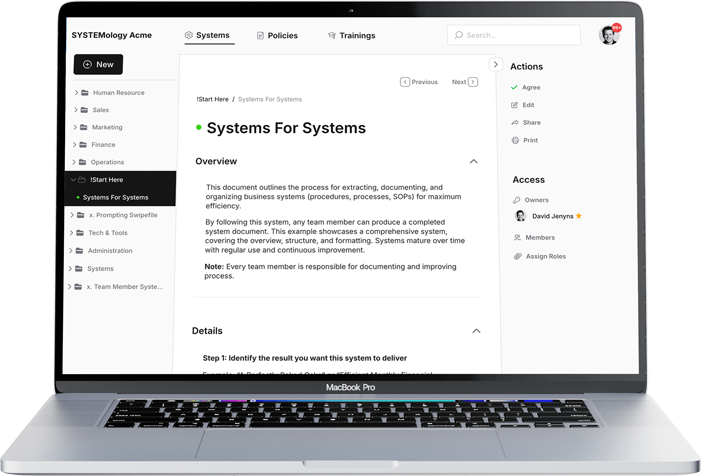
41 systems for a probate practice: 9 that carry a matter from referral to closed estate, 32 that run the firm around it, plus 33 templates and 9 AI drafting assistants. Start a free trial and ask our team to load the pack into your account.
Start free trialFAQ
Common questions
Is this legal advice?
No. These are workflow documents: who does what, in what order, and how you know it is done. Anything that depends on your state, such as deadlines, forms, fees and trust account rules, is left as a highlighted gap for your firm to fill in.
What should a law firm SOP include?
What triggers it, who is responsible, the numbered steps in order, the templates or letters used along the way, and a definition of done so anyone can tell it has been completed. Leave a clear gap anywhere your state sets the rule, rather than guessing at it.
Is it only for probate firms?
The client flow systems are written for probate administration. The marketing, sales, operations, finance, HR and management systems fit most small firms, and any firm can use the Critical Client Flow on this page to map its own matters.
Do I need a systemHUB account to read them?
No. Every system on this page opens as a public page with no login. You need an account to copy them, edit them and assign them to your team.
Where should a small firm start?
Pick one type of matter, map its client flow, then document the four or five systems that hurt most when they go wrong. For most firms that includes intake and trust accounting.
What is a Critical Client Flow?
The handful of stages every client moves through, from first hearing about you to the matter being closed, on one page. It shows where work stalls and which systems to build first.
These systems are workflow documentation, not legal advice. Rules that depend on your jurisdiction are left for your firm to complete.