
Why systemHUB
You’ve decided to document. The question is where it lives.
Your processes need somewhere your team can read, your AI can read, and neither one owns. That’s a different decision from “which SOP tool”, and it’s the one that matters now.
The trap
Each option fails in a way you can predict.
 Google Drive
 SharePoint
 Notion
 Google Sites
A shared drive. A wiki like Notion. A dedicated SOP tool. Your AI. Or nowhere, which means it stays in people’s heads and you’re back where you started. We’ve watched every one of them play out, and none of them fail because the owner didn’t care.
Google Drive or SharePoint
It works for about a month. Then nobody can tell which version is current, so the team stops opening files and asks the person who knows. One of our members calls hers “The Oracle”. Storage isn’t documentation.
Notion or a wiki
Infinitely flexible, which is the problem. Building and maintaining the structure becomes somebody’s second job. Six months later it’s a beautiful skeleton with nothing alive in it.
Other SOP tools
You get a blank page and good luck. No guidance on what to document first, no framework for getting the team to follow it, no plan for keeping it alive once the enthusiasm fades. A container with no recipe.
“We’ll just put it in our AI”
The newest answer and the one that looks smartest. But a prompt in somebody’s private account has no owner, no review date, and no way for anyone else to know it exists. You can ask a person how they do it. You can’t interview an automation.
The difference
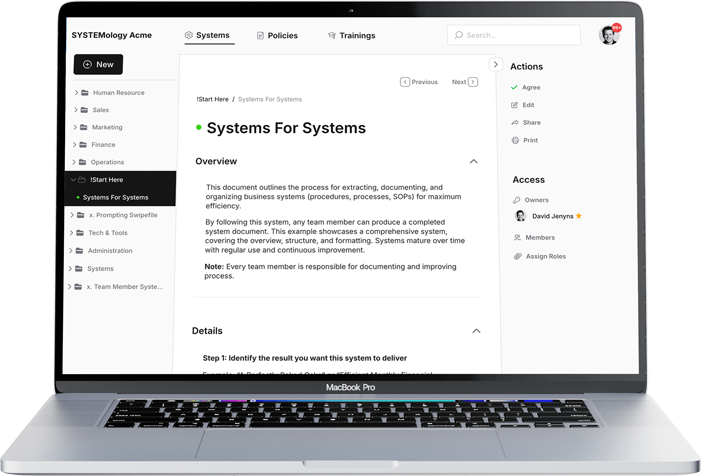
Six things only systemHUB gives you.
A method, not a blank page
SYSTEMology is built in. You’re told what to document first, in what order, and how to get the team using it. Every other tool hands you an empty folder.
Readable by humans and AI
One record. Your new hire opens it and does the job. Your AI reads the same live process through MCP, the open plug most AI tools now support, and answers from it. No second copy quietly drifting out of date.
Proof, not hope
See who has signed off on each process and who has completed the training attached to it. A record with a name and a date on it. No AI brain or shared folder can tell you that.
Permissions that cover AI
Your team needs the install process, not your margins. Your AI needs to understand how you quote, not the salary review. Control access document by document, for people and for the AI.
Built for your business size
We’re a small business, not a venture-backed platform shipping features to justify a valuation. systemHUB only has what the method needs, because complexity is what kills systemisation.
No AI lock-in
Your knowledge lives here, not inside one AI vendor’s account. When a better model ships, point it at the same record and keep moving. Escape AI lock-in →
No lock-in
Own the brain. Rent the AI.
We’re not going to tell you to slow down on AI. We use it harder than most of our clients do. But the AIs are becoming interchangeable, and your business isn’t. The tool is the engine. Your knowledge is the driver.
It’s the same thinking you’d apply to a key supplier or a key staff member. Lock-in is key person dependency wearing a different hat.
So keep the brain where you own it. One record, read by your team and read by any AI you plug in. Swap tools whenever you like: nothing to migrate, nothing to re-teach, nothing lost.
Side by side
systemHUB vs the alternatives
Swipe the table to compare →
| systemHUB | Drive / SharePoint | Notion / wiki | Other SOP tools | “Just AI” | |
|---|---|---|---|---|---|
| Documentation method included | ✓ | ✗ | ✗ | ✗ | ✗ |
| Readable by a human with no training | ✓ | ✓ | ✓ | ✓ | ✗ |
| Readable by your AI, live | ✓ | Partial | Partial | ✗ | ✓ |
| Shows who signed off | ✓ | ✗ | ✗ | Some | ✗ |
| Tracks training completion | ✓ | ✗ | ✗ | Some | ✗ |
| Survives you changing AI tools | ✓ | ✓ | ✓ | ✓ | ✗ |
| Has an owner and a review date | ✓ | ✗ | Manual | Some | ✗ |
| Everything out as a printable manual | ✓ | ✓ | ✓ | Some | ✗ |
| Implementation help available | ✓ | ✗ | ✗ | ✗ | ✗ |
“Just AI” means processes living inside prompts, projects, or custom GPTs rather than in a document anyone can open.
That’s the comparison. The rest is just doing it.
Start with one process — the one causing the most pain this week. You’ll know inside a fortnight whether this is the home your knowledge needed.
Free trial · The SYSTEMology method is built in, so you’re not starting from a blank page
The shift
From chaos to clockwork

Knowledge in heads, buried in drives, and locked inside somebody’s private AI account. Everything routes back through you.

One record, with an owner and a date on it. Your team runs off it. Your AI reads the same thing. Nothing routes through you.
Proof
What it looks like when the knowledge has a home.
“The systems were the asset. Without them, there was no sale.”
Thirteen years in, systems “all over the place”, and Jeanette was done. They mapped the client flow and moved everything into systemHUB. In 2019 PETstock bought the business at a high multiple.

Jeanette & Nicole Farren
“My daughter was 18 and didn’t know the industry. She’s now running it because she knows the systems.”
Ryan was the expert and the bottleneck. The breakthrough wasn’t a manager hire, it was making his daughter Eryn the Systems Champion. She runs a $15M builder at 21. Ryan takes 7-week holidays.

Ryan & Eryn Stannard
Documented first. Then the AI was worth 1,000 hours.
Shannon was the bottleneck in her own accounting firm. They documented the core systems first. Then her son Ryan took the Systems and AI Champion seat and automated file-noting across three systems.

Shannon Smit & Ryan
Sound familiar?
Problems systemHUB solves.
“Every decision still comes through me.”
Get the business running on documented systems instead of your memory. →
“I can’t take a real holiday without the phone blowing up.”
Build a team that handles a fortnight without you, calmly. →
“When good people leave, everything they knew leaves too.”
Capture the know-how while they’re still in the building. →
“New hires take months to become useful.”
Onboard from a playbook, not over-the-shoulder shadowing. →
“Growing just seems to mean more chaos.”
Scale on systems that don’t buckle when volume doubles. →
“AI is everywhere, but it doesn’t know our business.”
Give any AI your playbook, without marrying one platform. →
“We’ll write it all down when things calm down.”
The only time this works is before. You can’t buy cover while the building’s on fire. →
“What do I actually own here?”
Not your staff, not your AI, not the software. Only how you do what you do. →
“I want to sell one day, but the business is me.”
Make it transferable, so a buyer is paying for a business and not a job. →
Straight answer
Software alone won’t fix this.
Plenty of people arrive wanting to buy the platform and run it themselves. Sometimes that’s exactly right. Often it isn’t, and we’d rather say so than take the money.
The question worth answering before you buy anything: is this actually a software problem, or are you trying to build a business that doesn’t depend on you?
If it’s the first, systemHUB on its own will serve you well. If it’s the second, the tool is the easy part and the method is what you’re missing. Buying software to solve a key person dependency problem is how people end up with an empty account and the belief that systemisation doesn’t work for their business.
If it’s the method you need, start here →
Straight talk
What owners usually ask first.
Because they do different jobs. Your AI is the engine. systemHUB is where the knowledge it runs on lives, in a form a human can also read.
Put your processes only inside an AI and they exist in one person’s account, with no owner, no review date, and no way for anyone else to know they’re there. That’s not a system, it’s an invisible one. Connect the two and the AI answers from your live processes instead of a copy somebody pasted in six months ago.
None of them, permanently. The leaderboard changes every quarter, and each platform quietly makes leaving expensive: chat history, custom instructions, and prompts that don’t transfer.
Keep the knowledge layer in systemHUB and the choice stops mattering. Whichever AI is best this month reads the same record through MCP, and swapping costs you nothing. Why you shouldn’t go all in on one AI →
You can, and plenty of businesses start there. The failure isn’t technical, it’s that nothing tells you what to document first, nobody owns each document, and there’s no signal about what’s current.
Six months in you’ve got a folder nobody opens, and the team is back to asking you. Storage is not documentation.
False starts are normal, and the conclusion people draw from them is usually wrong. It’s not that your business can’t be systemised. It’s that you stopped before reaching minimum viable systems.
In Dave’s words: “People then go, oh yes, we tried to systemise, but it doesn’t work, our business isn’t systemisable. And it reinforces that behaviour.” The fix is a smaller starting scope, a Systems Champion who isn’t you, and a real pain to solve first rather than a tool to roll out.
This is the most common concern we hear, and it’s almost always a tooling and culture problem rather than a people problem. Most of the resistance is front-loaded onto existing staff, and most owners quit right at that hump.
Every team member needs to understand what’s in it for them. As Dave puts it: “Do you know how you move your way up in our organisation? You capture your process and you delegate your tasks down. That doesn’t make you less valuable, that makes you more valuable.”
Your calendar is never going to open up on its own. Systems work is permanently important and never urgent, which is why “I don’t have time” is usually the signal you need it most.
It also isn’t your job. The person doing the work records themselves doing it once, and somebody else turns that into the procedure. Owners who try to write it all themselves burn out, give up, or both.
This is the question that stops people who already agree with everything else. It usually sounds like “our delivery process is enormous, how do we possibly capture that”, or “is booking a patient in sales or operations?”
You start with the Critical Client Flow. That’s the path a customer takes from first contact to money in the bank, and it’s usually 10 to 15 processes covering about 80% of what actually runs your business. Not the org chart, not every department, just that one line.
Document those, and the rest can wait. Most people who stall started too wide.
You shouldn’t, and it’s a real failure mode. One of our members puts it well: people get into their groove and start systemising anything with a heartbeat, including things that aren’t worth systemising yet.
A process earns documentation if it meets one of four tests. It happens often, it currently depends on one person, mistakes are expensive, or you’re about to hand it to someone else. If it fails all four, leave it.
Documentation is a cost as well as an asset. A hundred systems nobody opens is worse than fifteen the team actually runs off.
Fair question, and the honest answer is that you should be deliberate rather than paranoid. Truly sensitive material, personal, medical, or financial, shouldn’t be going into a general AI tool at all.
Inside systemHUB you control access document by document, for people and for the connected AI. Your AI can understand how you quote without ever seeing the salary review. That’s the point of putting permissions on the source rather than trusting a chat window.
Two different situations. If you genuinely don’t have product-market fit yet, don’t systemise. Find what works first, then document what you want repeated.
But if you’re established with a couple of staff or subbies, small is easier to systemise, not harder. There’s less to capture and less legacy to unpick. Start ugly, record yourself doing the work, and improve it later.
That’s a fair pet peeve and we share it. The trouble with a lot of ISO work is that the only time anybody opens the systems is when the audit comes around.
Worth noting that certification doesn’t solve this by itself. One of our members came to us already holding ISO 9001 and 27001 and still had the same problem: plenty of documented process, plenty of team pushback, nobody using it day to day.
This is the opposite. Active documents the team trains against and uses daily, with problems surfaced and fixed as they come up rather than at an annual review. If nobody opens it, it isn’t working, and that’s a design failure rather than a compliance one.
Go deeper
Where to next
The invisible business →
Why knowledge inside your AI is a risk nobody has named yet.
Connect your AI →
How the MCP server lets Claude and ChatGPT read your live systems.
Escape AI lock-in →
Why your business brain should outlive whichever AI is winning this month.
Use cases →
Where owners start, and the first processes worth documenting.
Why SYSTEMology →
If it’s the method you need rather than the software.
Customer stories →
Businesses like yours, and what changed after they documented.
Give the knowledge a home.
Start with one process. The one causing the most pain this week. Get it out of your head and into somewhere your team and your AI can both read it.
Prefer to see the numbers first? Plans and pricing →
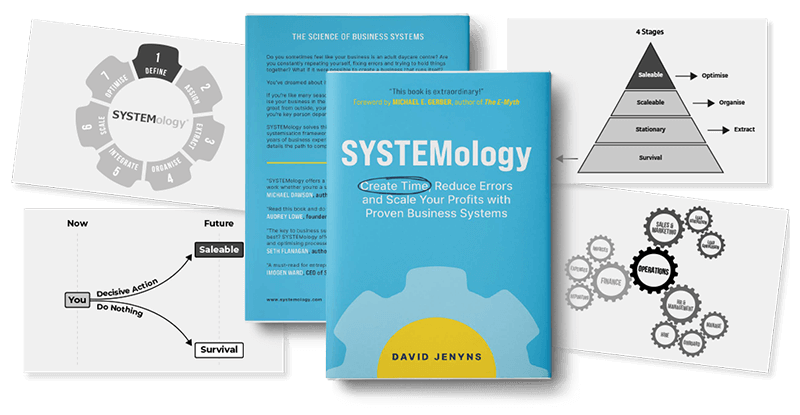
Built on SYSTEMology®, the framework behind the book