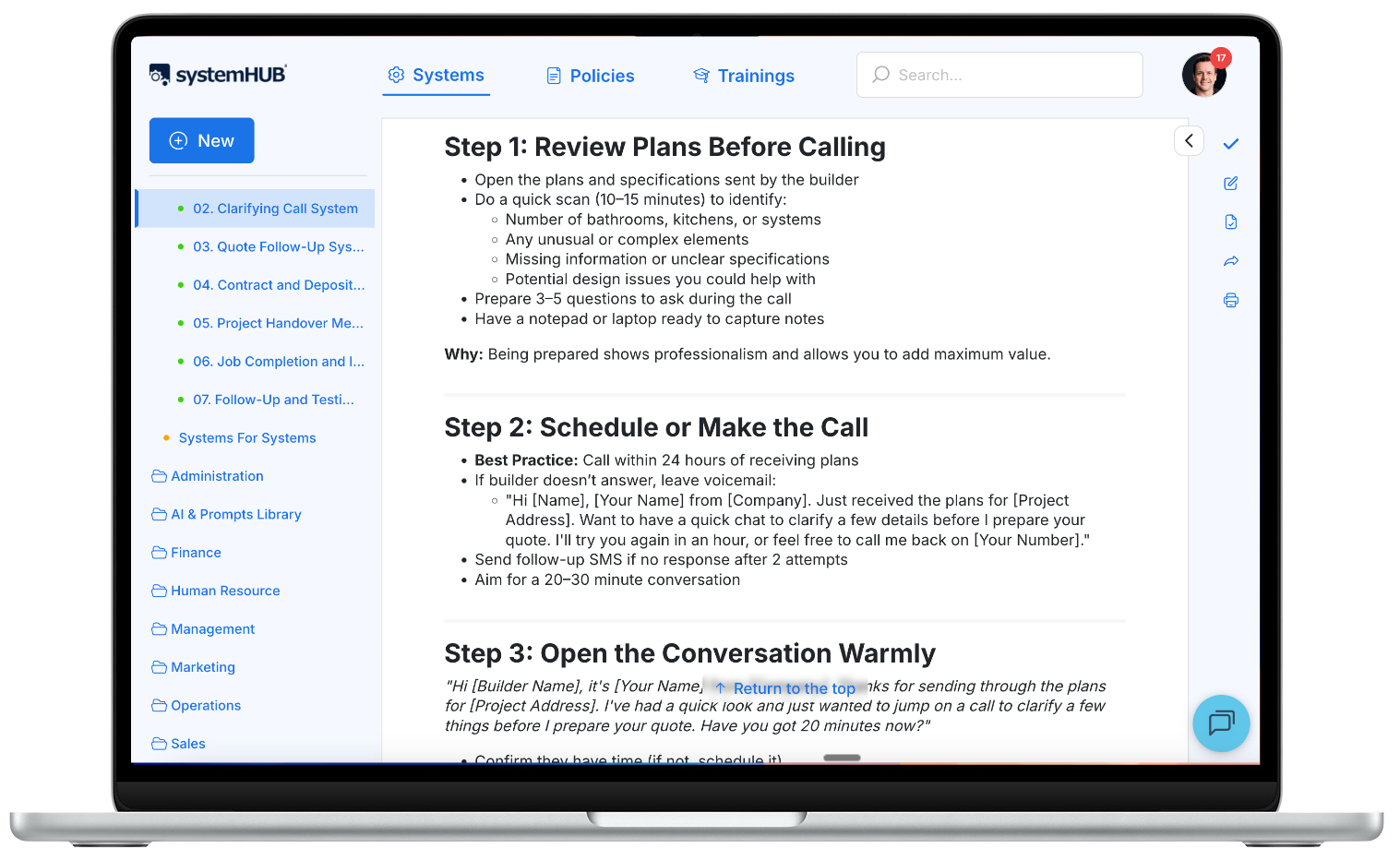
Think writing a procedure means sitting down with a blank document and typing out every step from memory?
That’s the approach most business owners take. And it’s exactly why most procedures never get written.
You sit down. You stare at the screen. You try to remember every step of a process you’ve done a thousand times on autopilot. You second-guess yourself. You get interrupted. You save the draft and tell yourself you’ll finish it later. Later never comes.
Here’s the thing: the problem isn’t discipline. It’s method. There’s a faster, more accurate way to write a procedure, and it doesn’t require you to write a single word from scratch. In this guide, you’ll learn the extraction method that’s helped hundreds of business owners document their procedures without the blank-page paralysis. You’ll also see real examples, a proven format, and a clear process you can start using today.
In this guide:
- What is a business procedure?
- Why most procedure writing fails
- The extraction method: how to write a procedure without writing
- The anatomy of a good procedure
- Procedure examples you can adapt
- Testing and improving your procedure
- Where to store your procedures
- Common mistakes when writing procedures
- Frequently asked questions
What is a business procedure?
A business procedure is a documented set of steps that tells someone how to complete a specific task to a consistent standard. That’s it. No complexity required.
Think of it like a recipe. A recipe tells you the ingredients, the method, and what the finished dish should look like. A procedure does the same thing for your business: it captures exactly how to complete a task so the result is the same every time, regardless of who’s doing it.
Here’s the distinction that matters: a procedure isn’t a policy (what to do) or a goal (what to achieve). It’s the how. The step-by-step instructions that connect your intentions to consistent results.
Every well-structured procedure has three essential components:
1
Trigger
What kicks off the process
2
Steps
The sequential actions to follow
3
Endpoint
How you know it’s complete
A trigger might be “new client enquiry received” or “first Monday of the month.” The steps are the numbered actions someone follows. The endpoint describes what “done” looks like. Without all three, you’ve got notes, not a procedure.
You’ll also hear people call them standard operating procedures (SOPs), processes, playbooks, or systems. The label doesn’t matter. What matters is that the knowledge gets out of people’s heads and into a format your team can actually follow.
Why most procedure writing fails
If you’ve ever tried to write a procedure from scratch, you know the feeling. You open a blank document. You start typing. Somewhere around step four, you realise you’ve already skipped two steps you do unconsciously. You go back, try to fill in the gaps, and the whole thing starts to feel like an overwhelming mess.
This is the traditional approach to writing procedures, and it fails for three reasons.
1. It’s never urgent
You know procedures are important. Everyone does. But when you’re juggling client work, hiring, and putting out daily fires, documenting how your team answers the phone just doesn’t make the priority list. Procedures sit in the “important but not urgent” category, which means they almost never get done.
2. Experts skip steps without realising it
The people who know a process best are often the worst at describing it. When you’ve done something a thousand times, large chunks of it become automatic. You skip steps in your explanation because you don’t even think of them as steps anymore. A chef doesn’t think “pick up the knife” as a conscious action. It’s invisible. The same thing happens when a business owner tries to write their processes and procedures from memory.
3. The wrong person is doing the writing
Here’s the insight that changes everything: the business owner is typically the worst person to be documenting procedures. I freely admit that I’m a recovering micromanager. For years, I believed that if I wanted something documented properly, I had to do it myself. But all that approach gave me was a growing list of procedures I’d never get to.
The truth is, your knowledgeable team members already know how to do these tasks. They’re doing them every day. The problem isn’t a lack of knowledge. It’s the method of capture.
The old way: everything runs through the owner.
The SYSTEMology way: your team runs the systems, you run the business.
The extraction method: how to write a procedure without writing
This is the core of the SYSTEMology approach, and it flips conventional procedure writing on its head. Instead of sitting down to write, you extract the knowledge from the person who already does the task well.
The secret? Procedure creation is a two-person job. One person shares their knowledge (the knowledgeable worker, or “knower”). Another person documents it (your systems champion). When you make this a two-person effort, you completely change the game.
Why two people instead of one?
If you try to get one person to do both parts, explaining and documenting, you’ll hit resistance every time. But if you record someone doing a task they already know how to do, then assign someone else to write it up, you remove the biggest bottleneck. Most people prefer editing something that already exists rather than creating from a blank page. Your knower demonstrates. Your systems champion documents. Everyone plays to their strengths.
Here are the seven steps to write a procedure using the extraction method.
1. Define the procedure and the result
Start by picking a specific task from your business. Give it a clear, descriptive name. “Handling an incoming enquiry.” “Weekly invoice processing.” “New client onboarding.” The name should tell someone exactly what this procedure covers.
Then define the result. What does “done” look like? For an incoming enquiry procedure, the result might be: “Enquiry is logged in the CRM, the prospect has received an acknowledgement email, and a follow-up task is scheduled within 24 hours.” Clear targets make clear procedures.
2. Identify the knowledgeable worker
This is the person on your team who currently does this task and does it well. They might not be the fastest, but they consistently produce quality results. In SYSTEMology, we call them the “knower.”
The critical point: the knower doesn’t write the procedure. Their only job is to demonstrate it. Someone else watches and documents. This separation is what makes the whole process work, because showing how you do something is infinitely easier than writing it from scratch.
3. Choose the capture method
How will you record the knower doing the task? Match the method to the task:
- Office or computer-based tasks: screen-recording software (Loom, Zoom, or similar)
- Physical tasks (warehouse, field work, trades): phone camera or GoPro
- Phone-based tasks (sales calls, client conversations): voice recording app
- Complex or multi-step tasks: a combination of methods
If it’s not possible to capture the task happening live, have the knower walk your systems champion through the process step by step, talking through each action as if they were doing it in real time.
4. Record the task being completed
Hit record and let the knower do their thing. Ask them to describe everything they’re doing as they do it. Don’t worry about mistakes. If they stumble, just keep rolling. Errors can be edited out later, and sometimes the mistakes are instructive because they show how to recover when things go wrong.
A little preparation helps. Ask the knower to jot down a few bullet points beforehand so they’ve thought through a task they might normally do on autopilot. But don’t over-prepare. You want to capture how the task is actually done, not an idealised version of it.
Tip: Not everyone is comfortable being recorded. A little scene-setting goes a long way. Explain why you’re doing this (“so the team can handle things while you’re on holiday”) and make it clear that the heavy lifting, the documentation, uploading, and formatting, will be handled by someone else. All they need to do is carry out the task and talk about it.
5. Create step-by-step documentation
Now the systems champion takes over. They watch the recording and break the task down into numbered steps. Literally: “Step 1: Do this. Step 2: Do that.” Each step should be as detailed as it needs to be, using sub-bullets for clarification where required.
How detailed is detailed enough? Write for smart people who need clear guidance, not robots who need every keystroke spelled out. A reader with some relevant experience should be able to scan the step headings and know roughly what to do, then read the sub-steps for the finer details.
As Reed Hastings, the founder of Netflix, once said: “What we failed to understand is by dummy-proofing all the systems, we would have a system where only dummies wanted to work there.” Write for the calibre of people you want on your team.
6. Review with the knowledgeable worker
Send the documented procedure back to the knower. Rather than just reading it, ask them to follow the steps next time they actually complete the task. This real-world test catches errors, missing steps, and anything that might send someone off track.
The knower gives feedback. The systems champion updates the document. One round of this is usually enough to get a solid version one. Avoid the temptation to re-engineer the process at this stage. Just capture how things are currently done. Optimisation comes later.
7. Test with a fresh team member
This is the real test. Have someone who’s never done this task before follow the procedure. They watch the recording, read the steps, and attempt to complete the task. If they can do it to a reasonable standard with minimal questions, your procedure works. If they get stuck, you know exactly where to add more detail.
Every gap they find is an opportunity to improve. And every new hire is an opportunity to test your procedures with fresh eyes.
Want ready-made procedure templates?
Download our free SOP templates and start with a proven format your team can follow from day one.
The anatomy of a good procedure
Once you’ve extracted the knowledge using the method above, here’s what the finished procedure should include. This format keeps things consistent across your entire documentation library.
1. A clear, searchable title
The title should be concise and descriptive. “Handling an incoming enquiry.” “Processing a customer refund.” “End-of-month financial reconciliation.” Think about what someone would type into a search bar when looking for this procedure. Use a consistent naming convention so your whole library follows the same pattern.
2. A brief description of the result
One or two sentences that state what this procedure achieves and what outcomes are expected. This tells the reader whether they’re looking at the right document before they dive into the steps.
3. A trigger
What event or condition kicks off this procedure? “A new client signs the agreement.” “It’s 2:00 PM on Friday.” “A customer complaint is received.” Without a trigger, people don’t know when to use the procedure.
4. Numbered steps
The core of the procedure. Each step describes one action. Use sub-bullets for clarification when a step has nuance, but keep the top-level steps scannable. Someone should be able to read just the step headings and understand the flow.
5. An endpoint
How do you know the task is complete? This might be a checklist of conditions (“invoice sent, CRM updated, follow-up scheduled”) or a specific deliverable (“signed contract uploaded to the client folder”). The endpoint prevents people from finishing 90% of a task and thinking they’re done.
6. Supporting notes
Link to the original video recording. Attach any templates, forms, or tools needed. Note the name of the knowledgeable worker (they become the go-to person for questions about this procedure). This section turns a good procedure into a complete resource.
Formatting tip: Consistency matters. Your systems champion should use the same writing style, numbering format, and layout across every procedure. When all your procedures look and feel the same, your team can navigate any of them without a learning curve. For a deeper look at SOP creation, see our beginner’s guide.
Procedure examples you can adapt
Seeing real examples makes the format click. Here are four procedures from different areas of a typical business. Each follows the trigger-steps-endpoint structure described above. Use them as a starting point and customise for your own team.
Operations: Client onboarding procedure
Trigger: New client has signed the agreement and made their first payment.
- Send the welcome email using the standard template (include login details, key contacts, and what to expect in the first week)
- Create the client folder in the project management tool and upload the signed agreement
- Schedule the kickoff call within 5 business days
- Add the client to the internal tracking spreadsheet with start date and assigned team member
- Prepare the kickoff agenda: review scope, timeline, communication preferences, and first deliverable
- Conduct the kickoff call and confirm all details in a follow-up email within 24 hours
Endpoint: Client has received their welcome email, kickoff call is completed, and all records are updated in the project management tool.
Finance: Invoice processing procedure
Trigger: Every Friday at 2:00 PM (or the last business day of the week).
- Review completed jobs or delivered services for the week in the project management tool
- Cross-reference with client agreements for correct billing amounts and payment terms
- Generate invoices in accounting software with correct line items, tax, and payment terms
- Double-check client details (name, email, ABN/tax number) before sending
- Send invoices via email and log the send date in the tracking sheet
- Flag any overdue invoices from previous weeks for follow-up on Monday
Endpoint: All completed work for the week has been invoiced, send dates are logged, and overdue accounts are flagged for follow-up.
Sales: Handling an incoming enquiry
Trigger: New enquiry received via phone, website form, or email.
- Acknowledge the enquiry within 2 business hours (phone callback or email reply)
- Log the enquiry in the CRM with contact details, source, and a summary of what they need
- Qualify the lead: do they match our target client profile? (Budget, timeline, service fit)
- If qualified, schedule a discovery call or meeting within 3 business days
- Send a confirmation email with the meeting link, a brief agenda, and any relevant resources
- If not qualified, send a polite response with alternative resources or referrals where appropriate
Endpoint: Enquiry is logged in the CRM, the prospect has received a response, and a next step (meeting or closure) is scheduled.
Marketing: Social media content publishing
Trigger: Content calendar shows a scheduled post for today.
- Open the content calendar and review today’s scheduled post (copy, image, platform, time)
- Check that the image or video meets the platform’s size requirements
- Proofread the caption for typos, broken links, and correct hashtags
- Schedule or publish the post at the designated time using the scheduling tool
- Monitor for comments and engagement within the first 60 minutes and respond where appropriate
- Log the post as published in the content calendar with a link to the live post
Endpoint: Post is live on the correct platform, engagement is being monitored, and the content calendar is updated.
Want more examples? Browse our library of free SOP templates covering procedures across all six core business departments. You can also check out our collection of simple SOP templates for quick-start formats. For the full methodology behind the extraction method, pick up a copy of the SYSTEMology book.
Ready to store and manage your procedures?
systemHUB gives your team one searchable home for every procedure, checklist, and SOP. Organise by department, assign owners, and keep everything up to date.
Testing and improving your procedure
Writing the procedure is only half the job. The real test happens when someone uses it.
Once the knower and the systems champion are happy with the first draft, it’s time to put it into action. Have the knower follow the documented steps next time they complete the task. They’ll spot any gaps, unclear instructions, or steps that need reordering. This real-world validation catches things that desk reviews miss.
Then comes the true litmus test: hand the procedure to a team member who’s never done this task before. Give them the recording, the written steps, and let them have a go. If they can complete the task to a reasonable standard without constant intervention, your procedure works. If they get stuck, you know exactly where it needs more detail.
The Kaizen approach to procedures.
Version one of any procedure will have gaps. That’s expected and completely fine. The SYSTEMology framework embraces constant improvement. Each time the procedure is followed, each time a new person uses it, each time the task evolves, the procedure gets a little better. Perfection is not the goal. Progress is. You should also view new hires as an opportunity to review every procedure related to that person’s role. Fresh eyes reveal things that experienced team members have stopped noticing.
This iterative approach builds repeatable processes that actually hold up in the real world, not just on paper.
Where to store your procedures
A procedure that’s buried in a Google Drive folder nobody checks is almost as useless as no procedure at all. Your documentation needs to live in a central, searchable location where your team can find it in seconds.
Organise procedures by department: Marketing, Sales, Operations, Finance, HR, Management. Use clear, consistent naming so people know what they’re looking at before they click. And make sure the system you choose is easy to update, because procedures will evolve. Version one is never the final version.
The worst option is scattering procedures across email attachments, shared drives, and random folders. The best option is a dedicated systems management platform like systemHUB, where every procedure is searchable, organised, and accessible to the people who need it. When your team can find the right procedure in seconds rather than minutes, they’ll actually use it.
Not sure where your business stands when it comes to documented procedures? Take the free Systems Strength Test to see where the gaps are and where to focus first.
Common mistakes when writing procedures
Trying to write from memory instead of recording. This is the single biggest reason procedures don’t get finished. Sitting down with a blank document and trying to recall every step produces incomplete, inaccurate results. Record the knower doing the task. Every time. The recording doesn’t need to be polished. It just needs to capture what actually happens.
Making it a one-person job. When the same person who does the task is also expected to document it, you’re fighting human nature. The SYSTEMology extraction method works because it separates the knowing from the writing. The knower demonstrates. The systems champion documents. Two people, playing to their strengths.
Over-engineering the first version. A common trap is to re-engineer the process while documenting it. Someone wants to add extra steps, introduce new tools, or optimise the workflow. Resist this. Your first version should capture how the task is currently done. Optimisation comes after you’ve got consistency. Trying to perfect a procedure before it exists guarantees it will never get finished.
Writing for the lowest common denominator. Your procedures should guide competent adults, not spell out every mouse click. If you write procedures that assume zero intelligence, you’ll attract team members who match that assumption. Write for the calibre of people you want working in your business.
Overloading with screenshots. It sounds helpful to include a screenshot for every step. In reality, software updates constantly, and those screenshots become outdated almost immediately. Now you’ve got a maintenance nightmare. Keep screenshots to a minimum. The video recording is your visual reference.
Not testing with fresh eyes. If the only person who’s ever read your procedure is the person who wrote it, you have no idea whether it actually works. The real test is handing it to someone unfamiliar with the task. Their confusion points are your improvement opportunities.
Frequently asked questions
How do you write a procedure step by step?
The most effective method is the extraction approach: define the task and the desired result, identify the knowledgeable worker (the person who does this task best), record them completing the task while talking through each action, then have a systems champion watch the recording and document the steps in a numbered sequence. Review the draft with the knower, then test it with a fresh team member to find any gaps.
What is the best format for writing a business procedure?
Every good procedure includes a clear title, a brief description of the expected result, a trigger (what starts the process), numbered steps, an endpoint (how you know it’s done), and supporting notes with links to video recordings and any templates needed. Keep steps scannable. A reader should be able to understand the flow from the step headings alone.
Who should write the procedures in a small business?
Not the business owner, and not necessarily the person who does the task. In SYSTEMology, procedure creation is a two-person job. The knowledgeable worker (the person who does the task best) demonstrates and records. A systems champion (a detail-oriented team member) watches the recording and writes the documentation. This division of labour is the key to actually getting procedures completed.
How detailed should a procedure be?
Detailed enough that a competent person can follow it without getting stuck, but not so detailed that it reads like a software manual. Most everyday procedures can be captured in 5 to 15 steps. Low-skilled roles with high turnover may require more detail. Experienced team members in specialised roles may need less. Write for smart people, not robots.
What is the difference between a procedure and a process?
A process is the broader sequence of activities that achieves a business outcome (like “client onboarding”). A procedure is the detailed, step-by-step instructions for completing one specific task within that process (like “sending the welcome email”). In practice, many people use the terms interchangeably. What matters is that the steps are documented clearly enough for your team to follow.
How do you test whether a procedure works?
The gold standard is to give the procedure to a team member who’s never done the task before. If they can complete it to a reasonable standard with minimal questions, the procedure works. If they get stuck, those sticking points tell you exactly where to add detail. Every new hire is also an opportunity to test and refine existing procedures with a fresh perspective.
How often should procedures be reviewed and updated?
Review whenever the task changes, such as new software, updated client requirements, or a restructured team. Schedule a broader review every 6 to 12 months. The SYSTEMology framework treats procedures as living documents. Version one is just the starting point. Constant and never-ending improvement is built into the methodology.
Can I use AI to help write procedures?
Yes, but AI works best as an accelerator, not a replacement for the extraction method. You still need the knowledgeable worker to demonstrate the task (AI can’t know the nuances of how your team actually works). Where AI shines is in turning a rough recording transcript into clean, formatted documentation. Feed it the recording notes and let it draft the steps. Then have your knower review and refine. It speeds up the systems champion’s work significantly.
Stop trying to write procedures from scratch
The biggest shift you can make today is this: stop treating procedure writing as a solo task that requires a blank page and perfect recall. It doesn’t work. It’s never worked. And it’s the reason most business owners have a head full of undocumented knowledge and a team that still needs them for everything.
Instead, use the extraction method. Find the person who does the task well. Record them doing it. Have someone else write it up. Test it. Improve it. Store it where your team can find it.
That’s how you write a procedure that actually gets finished. And used. And updated.
Start with one procedure this week. The one your team asks about most. The one that keeps pulling you back into the day-to-day. Document it, and you’ll have taken the first real step toward building a business that works without you in the middle of every task.
The procedure you document today is one less question you’ll answer tomorrow. Start with systemHUB and give your team a single home for every procedure in your business.