You bought the marketing automation software. So why is your marketing still manual?
You signed up for the platform. Connected your email. Maybe even built a few sequences. For about a week, it felt like progress. Then the welcome emails started going to the wrong people. Leads fell through the cracks. And nobody on your team could explain how the automations actually worked.
I’ve watched this happen to hundreds of business owners. They invest in marketing automation software expecting it to fix everything. Instead, it amplifies the mess that was already there.
The problem isn’t the software. It’s the order of operations. You automated before you systemised. And that’s where things go sideways.
In this guide, I’ll walk you through how to choose and implement marketing automation software the right way. Systems first. Software second. It’s the approach we teach in SYSTEMology, and it’s how you turn marketing automation into a genuine competitive advantage rather than an expensive distraction.
In this guide:
- What is marketing automation software?
- Why your business needs marketing automation
- The SYSTEMology approach: document before you automate
- How to choose the right marketing automation software
- Popular marketing automation tools compared
- How to implement marketing automation step by step
- Common marketing automation mistakes
- Frequently asked questions
What is marketing automation software?
Marketing automation software is technology that handles repetitive marketing tasks without manual intervention. Instead of someone on your team manually sending emails, posting social updates, scoring leads, and tracking campaign performance, the software does it automatically based on rules and triggers you define.
At its most basic, marketing automation software sends a welcome email when someone joins your list. At its most powerful, it runs entire multi-step campaigns that nurture strangers into leads, leads into customers, and customers into repeat buyers.
The core capabilities of marketing automation software typically include:
- Email sequences: automated series of emails triggered by specific actions (sign-ups, purchases, abandoned carts)
- Lead scoring: assigning points to contacts based on their behaviour so your sales team knows who’s ready to buy
- Campaign management: planning, executing, and tracking marketing campaigns across channels from a single dashboard
- Segmentation: grouping contacts by behaviour, demographics, or engagement level for targeted messaging
- CRM integration: connecting your marketing data with your customer relationship management system so nothing falls between the cracks
- Analytics and reporting: measuring open rates, click rates, conversions, and ROI across campaigns
For small and mid-sized business owners, marketing automation software is the bridge between “I know I should be marketing consistently” and actually doing it. It takes the repeatable processes you’ve built and runs them at a scale no human team could match manually.
But here’s the catch. The software only works when there’s a clear, documented system underneath it. Without that foundation, you’re not automating your marketing. You’re automating your guesswork.
Why your business needs marketing automation
If you’re still running your marketing manually, you’re leaving time, money, and leads on the table every single day. Here’s why marketing automation software has become essential for growing businesses.
1. Consistency across every campaign
The biggest killer in small business marketing isn’t bad strategy. It’s inconsistency. You send a newsletter for three weeks, then life gets busy and it stops. You launch a lead magnet but forget to build the follow-up sequence. Prospects go cold because nobody followed up.
Marketing automation software removes “remembering” from the equation. Once a campaign is set up, it runs. Every lead gets the same welcome sequence. Every prospect gets nurtured on the same schedule. Your marketing becomes predictable, and predictable marketing produces predictable revenue.
2. Lead nurturing on autopilot
Most leads aren’t ready to buy the moment they find you. Research shows that 96% of website visitors aren’t ready to purchase on their first visit. Without a nurture system, those people vanish.
Marketing automation software lets you build sequences that keep your business in front of those leads for weeks or months. A well-structured email marketing sequence can educate, build trust, and move prospects toward a buying decision without anyone on your team lifting a finger.
3. Time saved on repetitive tasks
How many hours does your team spend sending individual emails, updating spreadsheets, and manually moving contacts between lists? Marketing automation eliminates that busywork. Instead of someone spending 10 hours a week on campaign admin, the software handles it and your team can focus on strategy, creative work, and serving clients.
4. Data-driven decisions instead of guesswork
When marketing runs through automation software, everything is measured. You can see which emails get opened, which links get clicked, which campaigns drive revenue, and which ones fall flat. That data changes how you make decisions. Instead of guessing what works, you know. And you can improve your processes based on evidence, not instinct.
5. Scalability without more headcount
Without automation, growing your marketing means hiring more people. More email senders, more campaign managers, more admin support. With marketing automation software, you can double or triple your output without doubling your team. The same two-person marketing team that handles 500 contacts can handle 5,000 when the right systems and software are in place.
Is your marketing ready to automate?
Before you invest in marketing automation software, find out whether your business systems are strong enough to support it. Take the free assessment.
The SYSTEMology approach: document your marketing before you automate it
This is where most advice about marketing automation software gets it backwards. Every guide jumps straight to tool comparisons and feature lists. Nobody talks about the step that actually determines whether your automation will succeed or fail.
You can’t automate what you haven’t documented.
In SYSTEMology, we teach a seven-stage process for systemising your business: Define, Assign, Extract, Organise, Integrate, Scale, Optimise. Automation lives within the Organise stage. And there’s a reason it doesn’t come first.
If you try to automate a marketing process that nobody has written down, you’ll automate the mess. Wrong emails will go to wrong people faster. Leads will get lost in broken workflows more efficiently. You’ll spend more time debugging the automation than you ever spent doing the work manually.
The sequence matters: Document, then delegate, then automate.
Try “human automation” first
In the SYSTEMology book, I explain a concept I call “human automation.” It’s how Google approaches things. You’d think the biggest tech company in the world would jump straight to machine automation. They don’t. Google’s search team first identifies what they want to improve, documents a hypothesis, and has thousands of human testers run through it manually. Only once the process is proven and consistent do they hand it to the machines. If it’s good enough for Google, it’s good enough for your marketing.
Marketing is one of six core departments every business needs to systemise. Alongside Sales, Operations, Finance, HR, and Management, your marketing department contains dozens of processes and procedures that can eventually be automated. But each one needs to be documented and tested manually first.
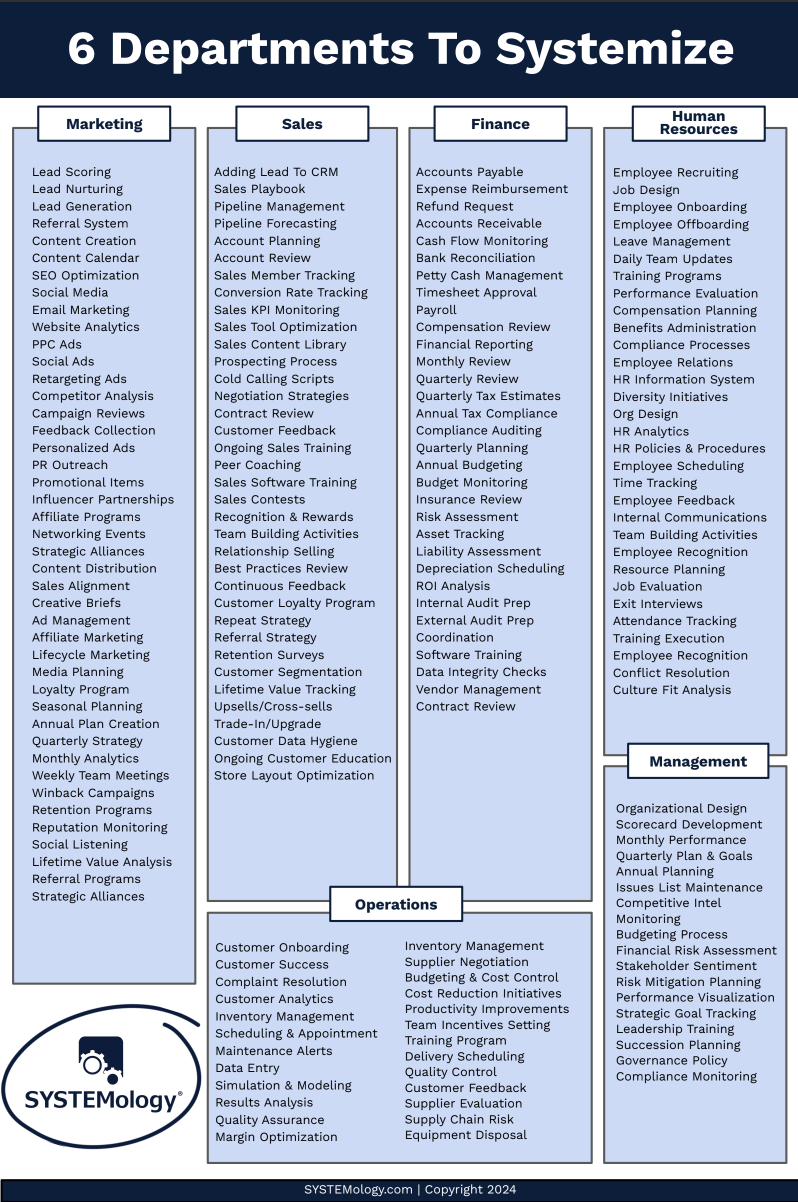
Marketing is one of six core departments to systemise. Document these processes before you automate them.
Think about your marketing workflows right now. Your lead capture process. Your email follow-up sequence. Your social media posting schedule. Your webinar promotion steps. Are these written down as clear standard operating procedures? Could a new team member pick them up and execute them without asking you a dozen questions?
If the answer is no, you’re not ready for marketing automation software yet. Document first. Get your team following the documented process consistently. Then, once the system is running smoothly with human hands, hand it to the software.

The old way: marketing lives in the owner’s head. Nothing is documented, nothing is consistent.

The SYSTEMology way: documented marketing systems your team (and software) can follow.
How to choose the right marketing automation software
Once your marketing processes are documented and running consistently, it’s time to choose the right software. Here’s how to make a smart decision instead of an impulsive one.
1. Map your marketing systems first
Before you look at a single tool, list every marketing process you want to automate. Be specific. Not “email marketing” but “new subscriber welcome sequence (5 emails over 14 days)” or “monthly newsletter creation and send.” The clearer your list, the easier it becomes to match features to actual needs.
This is where your documented SOPs become invaluable. If you’ve already built your marketing processes using the SYSTEMology framework, you have a ready-made checklist of exactly what your software needs to do.
2. Match features to your actual needs
Marketing automation platforms range from simple email tools to full enterprise suites. Most small businesses don’t need (and shouldn’t pay for) enterprise features. Match the tool to what you’ll actually use in the next 12 months, not what you might theoretically need someday.
If you only need email sequences and basic segmentation, a simpler platform will serve you better than a complex one that overwhelms your team. Remember: complexity is the enemy of adoption.
3. Consider integration with your existing tools
Your marketing automation software needs to talk to your other systems. Your CRM, your payment processor, your website, your process management tools. Before committing, check that the platform integrates natively (or through Zapier) with what you already use. Disconnected tools create data silos, and data silos kill automation.
4. Evaluate ease of use
The best marketing automation software is the one your team will actually use. If building a simple email sequence requires a computer science degree, it will gather dust. Look for visual workflow builders, drag-and-drop editors, and clear documentation. Better yet, have a team member (not the most tech-savvy one) test it during a free trial.
5. Start simple and scale
You don’t need every feature on day one. Start with the core use case that will save you the most time, get that working reliably, then expand. Most platforms let you upgrade as you grow. Starting with the entry-level plan keeps costs low and complexity manageable while you prove the value.
6. Don’t choose based on features alone
Support, community, training resources, and long-term pricing all matter. A tool with slightly fewer features but excellent onboarding support will outperform a feature-rich platform that leaves you stranded. Read reviews from businesses your size, not enterprise case studies.
Popular marketing automation tools compared
There’s no single “best” marketing automation software. The right choice depends on your business size, budget, and the specific marketing systems you’ve documented. Here’s a practical comparison of five widely used platforms.
HubSpot
Best for: Businesses that want marketing, sales, and CRM in one platform.
Key features: Email marketing, landing pages, lead scoring, CRM, social media scheduling, detailed analytics. The free tier is generous for small teams getting started.
Starting price: Free plan available. Paid marketing tools from $20/month.
Watch out for: Costs scale quickly as your contact list grows. The jump from free to premium can be steep.
ActiveCampaign
Best for: Small businesses that need powerful email automation without enterprise complexity.
Key features: Visual automation builder, email sequences, CRM, lead scoring, site tracking, conditional logic. Excellent automation depth at a reasonable price.
Starting price: From $29/month.
Watch out for: The learning curve for advanced automations can be steep. Reporting could be more intuitive.
Mailchimp
Best for: Businesses just getting started with email marketing and basic automation.
Key features: Email campaigns, basic automation journeys, landing pages, audience segmentation, reporting. User-friendly interface that most teams can pick up quickly.
Starting price: Free plan available. Paid plans from $13/month.
Watch out for: Automation capabilities are limited compared to dedicated platforms. Pricing model changed significantly in recent years.
Klaviyo
Best for: E-commerce businesses that need deep integration with their online store.
Key features: E-commerce-focused automation (abandoned carts, post-purchase flows, browse abandonment), predictive analytics, SMS marketing, deep Shopify/WooCommerce integration.
Starting price: Free up to 250 contacts. Paid plans from $20/month.
Watch out for: Less suitable for service-based businesses. Pricing increases sharply as contact lists grow.
Keap (formerly Infusionsoft)
Best for: Service-based businesses that want CRM and marketing automation tightly integrated.
Key features: CRM, email marketing, appointment scheduling, invoicing, pipeline management. Built specifically for small businesses and solopreneurs.
Starting price: From $249/month.
Watch out for: Higher price point than alternatives. The interface has improved but still has a learning curve.
Tip: The platform matters far less than the systems underneath it. A well-documented marketing process running on a basic tool will outperform a chaotic process running on the most expensive platform every time. Get your business systemised first, then choose the software.
Document your marketing systems before you automate them
systemHUB gives your team a central place to store, share, and follow every marketing process. When you’re ready to automate, you’ll know exactly what to hand to the software.
How to implement marketing automation step by step
Choosing the software is only half the job. Implementation is where most businesses stumble. Here’s the systems-first approach that actually works.
1
Document
Write down every step of the process before touching software
2
Delegate
Have your team run the process manually to prove it works
3
Automate
Hand the proven, consistent process to your software
Let’s break that down into specific steps.
1. Audit your current marketing processes
List every marketing task your team does regularly. Newsletter sends, social media posting, lead follow-up, campaign creation, reporting. For each one, note who does it, how often, and how long it takes. This audit reveals where automation will save the most time.
2. Document each workflow as an SOP
For the processes you want to automate, create a clear, step-by-step standard operating procedure. Include the trigger (what starts the process), each step in order, decision points, and the endpoint (how you know it’s done). This documentation becomes the blueprint your automation will follow.
3. Delegate and test manually
Before touching the software, have a team member run through the documented process manually. This is the “human automation” step. Does the process work? Are there gaps in the documentation? Do the steps produce the right outcome every time? Fix any issues now, while they’re cheap and easy to fix.
4. Identify your automation candidates
Not every marketing process should be automated. The best candidates are repetitive, rule-based, and happen frequently. Your welcome email sequence is a perfect automation candidate. Your quarterly brand strategy review is not. Focus on business process automation that saves meaningful time.
5. Set up and test your automations
Build your automations one at a time. Start with the simplest, highest-impact workflow. Test it thoroughly before moving to the next one. Send test emails to yourself. Walk through every trigger and condition. Check that contacts move through the workflow correctly. Automation bugs are invisible until a customer complains.
6. Monitor, measure, and optimise
Marketing automation is not “set it and forget it.” Schedule a monthly review of your automations. Check open rates, click rates, conversion rates, and unsubscribes. Look for drop-off points in your sequences. Update your SOPs when you find improvements. The best marketing systems are living documents that improve over time.
Common marketing automation mistakes
After working with hundreds of business owners on systemisation, I see the same marketing automation mistakes over and over. Avoid these and you’ll be ahead of 90% of businesses.
Automating undocumented processes. This is the most common and most costly mistake. If the process isn’t written down and tested manually, automating it just means the problems happen faster and at scale. Document first. Always.
Choosing software before mapping your systems. Picking a tool before you know what you need it to do is like buying a car before you have a driver’s licence. Map your marketing processes, identify what needs automating, then find the tool that fits. Not the other way around.
Trying to automate everything at once. Business owners get excited and try to automate 15 workflows in the first week. This leads to half-built automations, confused teams, and abandoned projects. Start with one workflow. Get it running perfectly. Then move to the next.
Ignoring your team in the process. Your marketing team needs to understand how the automations work, what triggers them, and what to do when something breaks. If only one person understands the system, you’ve just created a new single point of failure. Document the automation itself as a process your team can manage.
No measurement or review cycle. Automations that aren’t monitored slowly degrade. Links break, offers expire, sequences stop converting. Build a monthly review into your process management routine so your marketing automation stays current and effective.
Frequently asked questions
What is the best marketing automation software for small business?
There’s no single best platform. For most small businesses, ActiveCampaign offers the best balance of automation power and affordability. HubSpot is ideal if you want CRM and marketing in one place. Mailchimp works well if you’re just starting out and need something simple. The best choice depends on your documented marketing processes and what you actually need to automate.
How much does marketing automation software cost?
Entry-level plans start from free (HubSpot, Mailchimp) to around $30/month (ActiveCampaign). Mid-tier plans with more contacts and features typically run $100-300/month. Enterprise solutions like Keap start around $249/month. Costs usually scale with your contact list size, so factor in growth when budgeting.
Do I need marketing automation if I have a small list?
Yes, but start simple. Even with 200 contacts, a basic welcome sequence and follow-up automation saves time and improves conversion. The real question isn’t list size. It’s whether your marketing processes are documented and consistent. If they are, automation makes sense at any scale.
What’s the difference between marketing automation and email marketing?
Email marketing is one component of marketing automation. Marketing automation software goes beyond email to include lead scoring, segmentation, multi-channel campaign management, CRM integration, and workflow automation. Think of email marketing as a single instrument and marketing automation as the entire orchestra.
How long does it take to set up marketing automation?
If your marketing processes are already documented, you can set up your first automation in a few hours. A complete marketing automation system typically takes 4-8 weeks to plan, build, test, and launch. The key is not rushing it. Each workflow should be tested thoroughly before going live. Start with one or two automations and expand from there.
Should I document my marketing processes before choosing automation software?
Absolutely. Documenting your marketing processes first is the single most important step. When you know exactly what each workflow looks like step by step, choosing software becomes straightforward. You’re matching features to requirements instead of guessing. This is the core principle behind the SYSTEMology approach: document, delegate, then automate.
Can marketing automation replace my marketing team?
No, and it shouldn’t. Marketing automation handles the repetitive, rule-based tasks so your team can focus on strategy, creative work, and relationship building. The software executes the system. Your people design, monitor, and improve it. The goal isn’t to replace humans. It’s to free them from busywork so they can do the work that actually moves the business forward.
Marketing automation software works when your systems work first.
The businesses that get the most from marketing automation aren’t the ones with the fanciest tools. They’re the ones that took the time to systemise their business before they automated it. Document your marketing processes. Test them with real people. Then hand the repetitive parts to software and watch your marketing run without you.
Ready to build the systems foundation your marketing automation needs? See how systemHUB can help.