You know your business needs SOPs. You have tried to write one. You stared at a blank page, typed a few lines, got interrupted, and never came back to it.
Sound familiar? You are not alone. The reason that SOP never got finished is not because you are lazy. It is because the traditional approach to SOP creation is broken.
This beginner’s guide will walk you through creating your very first SOP using a method that does not involve writing from scratch. You will learn what an SOP is, why it matters, and exactly how to build one step by step.
In this guide:
What is an SOP (in plain English)?
An SOP, or standard operating procedure, is a written set of steps that shows someone how to complete a specific task the same way every time.
Think of it like a recipe. A recipe tells you the ingredients, the steps, and what the finished dish should look like. An SOP does the same thing for a business task. It tells your team member what triggers the task, what steps to follow, and how to know when it is done.
A few quick examples:
- How to handle an incoming phone enquiry
- How to onboard a new client
- How to process a weekly invoice run
- How to set up a new employee in your systems
An SOP is not a policy (that is the “what”). It is not a process map (that is the overview). An SOP is the “how” at the task level. It is the document your team reaches for when they need to complete a task to your standard, whether you are there or not.
Why SOPs matter (especially for small businesses)
If you run a small business, SOPs are not a “nice to have.” They are the foundation that lets you stop doing everything yourself. Here is why SOP creation should be a priority.
1. Consistency across your entire team
Without an SOP, every team member completes the same task their own way. Some do it well. Some miss steps. An SOP ensures everyone delivers the same result, every time.
2. Faster onboarding for new hires
SOPs turn weeks of shadowing into days. A new team member can read the SOP, watch the supporting video, and start contributing almost immediately.
3. Owner freedom (you stop being the bottleneck)
If your team cannot complete a task without asking you first, you are the bottleneck. SOPs give your team the answers before they need to ask. That is how you systemise your business and free yourself from the daily grind.
4. Fewer mistakes and less rework
When your team has a clear set of steps to follow, the chance of skipping something critical drops dramatically. You stop firefighting daily and start fixing exceptions instead.
5. A business that is actually worth something
A business that depends on the owner is not a business. It is a job. A business that runs on documented SOPs has real, transferable value. Whether you want to sell, step back, or simply take a holiday without your phone buzzing, SOPs make that possible.
Ask yourself: If you disappeared for a month, could your team keep delivering your core product or service? If the answer is no, SOP creation is the fix.

The old way: everything runs through the owner.

The SYSTEMology way: your team runs the systems, you run the business.
Want a head start on your first SOP?
Grab our free SOP templates and skip the blank-page problem entirely.
The biggest SOP creation mistake (and how to avoid it)
Most beginners sit down with a blank document and try to write their SOP from memory. This approach fails for three reasons.
First, experts skip steps unconsciously. The person who does a task every day has automated parts of it in their head. They do not realise they are skipping details a new person would need.
Second, writing is rarely their strength. The person who is best at completing the task is almost never the person who enjoys documentation. Asking them to do both is like asking a chef to write the cookbook while cooking dinner.
Third, there is always something more urgent. SOP creation is important but never urgent. The blank document stays blank.
The SYSTEMology approach flips this on its head. Instead of writing from scratch, you extract the knowledge from the person who already has it. SOP creation becomes a two-person job. One person (the “knower”) demonstrates the task. Another person (the “systems champion”) documents it. The knower never has to write a single word.
I stumbled onto this idea years ago when I was trying to systemise my digital agency. A mentor suggested hiring a consultant to document my processes. I hated the idea, but the principle stuck: I did not have to be the one writing. Eventually I started a podcast where I would interview experts about how they completed specific tasks, then had my team turn those interviews into documented SOPs. One person shares the knowledge, another documents it. That became the foundation of the extraction method used in SYSTEMology today.
How to create your first SOP (step by step)
Ready to build your first SOP? Here is the complete process. Follow these eight steps and you will have a working SOP by the end.
1. Pick one task from your Critical Client Flow
Do not try to document your entire business. In SYSTEMology, we use the Critical Client Flow (CCF) to identify the 10 to 15 core tasks that take a lead from first contact to happy customer. Pick one task from that flow.
If you have not mapped your CCF yet, choose a task your team does regularly that causes problems when done inconsistently. Good first candidates: handling inbound enquiries, sending client proposals, or processing invoices.
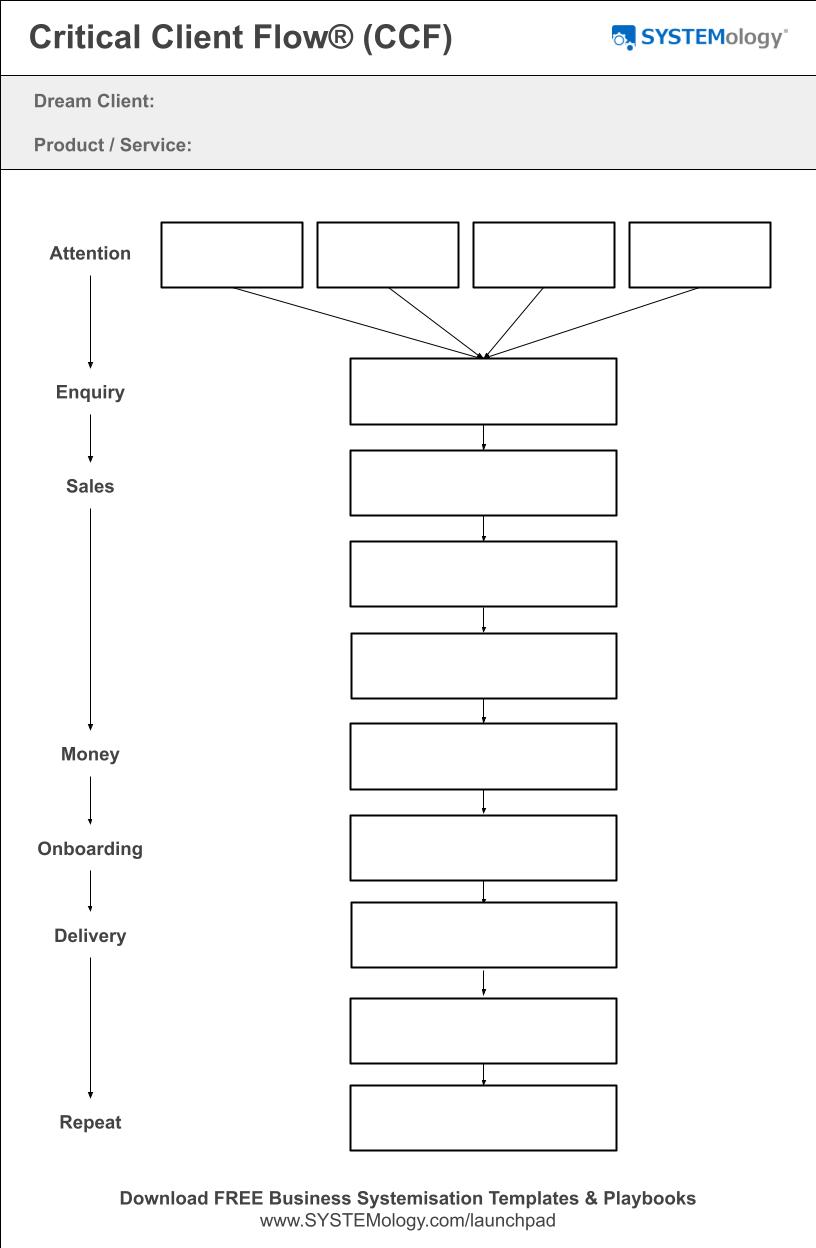
The Critical Client Flow maps the core steps of your business. Pick one task from here as your first SOP.
2. Identify the knower
Who on your team completes this task best? Not perfectly, just best. That person is your “knowledgeable worker” or knower. They have the expertise that needs to be captured. Identify them and let them know you want to record them completing the task.
3. Choose your capture method
For desk-based work, use screen recording software (Loom or Zoom). For physical tasks, use a phone camera. For phone-based tasks, use a voice recording app. Choose whatever creates the least friction for the person being recorded.
4. Hit record
Have the knower complete the task while talking through what they are doing. They do not need a script. They just do the task from start to finish and describe each step as they go. If they make a mistake, keep rolling. Reassure them: they are not creating the final document. Someone else will handle that.
5. Hand the recording to your systems champion
Your systems champion (the detail-oriented person on your team who enjoys organising things) watches the recording and writes out the steps. Literally: “Step 1: Do this. Step 2: Do that.” They turn a raw recording into clear, linear instructions. AI can do that first pass in minutes now, from the transcript, and the better tools flag what they did not hear instead of guessing. I ranked eight AI SOP generators on exactly that.
No systems champion yet? You can do this yourself, or consider hiring a part-time person. Return-to-work parents with corporate experience are often ideal for this role.
6. Review with the knower
Send the draft back to the knower. Ask them to follow the steps the next time they complete the task, not just read it. They will spot gaps and missing details. Most people prefer editing something that already exists over creating from scratch, so this step is usually quick.
7. Test with a fresh person
Have someone who has never done this task follow the SOP. Can they complete it without asking for help? If yes, the SOP works. If they get stuck, you know exactly where to add detail.
8. Store it centrally
Put the finished SOP somewhere your entire team can find it. Organise by department. Make it searchable. We will cover storage options in more detail below.
1
Record
The knower completes the task on camera
2
Document
The systems champion writes up the steps
3
Test
A fresh team member follows the SOP
Key principle: Your first version will not be perfect. That is the point. In SYSTEMology we call this the Minimum Viable System (MVS). Get version one done. Improve it the next time someone uses it. A “good enough” SOP that exists today is infinitely more valuable than a perfect one that never gets written.
What goes into a good SOP (the format)
You do not need a fancy template. But you do need consistency. Here is what every good SOP should include:
- Title: Clear and searchable. Use the words your team would type when looking for this SOP. For example, “Handling an Incoming Phone Enquiry” is better than “Phone Process v2.”
- Trigger: What kicks off this task? A new lead comes in. A client signs a contract. An invoice is due. The trigger tells your team member when to start.
- Numbered steps: The sequential actions, written in plain language. Use sub-steps where a step has multiple parts. Keep each step as detailed as it needs to be, but no more.
- Endpoint: How do you know the task is complete? What does “done” look like? This could be an email sent, a record updated, or a delivery confirmed.
- Supporting notes: Link to the original recording, any templates needed, and the name of the knowledgeable worker (the go-to person for questions).
Formatting tip: Use the same writing style, numbering format, and layout across every SOP. When all your SOPs look and feel the same, your team can navigate any of them without a learning curve. For more on this, see our guide on creating everyday procedures.
How detailed should your steps be? That depends on who will follow them. The goal is not to create instructions for robots. As Reed Hastings (founder of Netflix) put it: “By dummy-proofing all the systems, we would have a system where only dummies wanted to work there.” Write for smart adults. If you want a ready-made structure to follow, grab one of our simple SOP templates.
Your first SOP walkthrough (a real example)
Let us walk through a real example. You run a service business and only Sarah knows how to qualify inbound leads properly. If Sarah is sick, leads fall through the cracks. Perfect first SOP.
You ask Sarah to record herself handling an inbound call using a voice recording app. Your systems champion listens to the recording and writes out the steps. Sarah reviews the draft, adds a missing detail about checking the lead’s website. Then Tom, a new team member, follows the SOP on his next call. He flags that one step could use more detail. The SOP gets updated. Done.
Here is what the finished SOP looks like:
Sales: Handling an Incoming Phone Enquiry
Trigger: A new lead calls the office phone line.
- Answer the call with: “Thanks for calling [Company Name], [Your Name] speaking.”
- Open a notepad or document to take notes during the call.
- Collect the caller’s name, email, and phone number.
- Ask how they found you: “Before I get started, can I ask how you found us?”
- Ask what prompted the call and what they are looking for help with.
- Check their website (load it in a browser, note the CMS and size).
- Qualify the lead using the lead quality scale (A/B/C/F) and make a recommendation.
- Enter all lead information into the CRM with notes from the call.
- Send a follow-up email using the appropriate template within one business day.
- Set a reminder in the CRM for the next follow-up.
Endpoint: Lead is in the CRM with a follow-up scheduled, and the caller has received a follow-up email.
Specific enough to follow, not so detailed it reads like a novel. That is the sweet spot. Here is a second example:
Operations: New Client Onboarding
Trigger: Client signs the proposal and pays the deposit.
- Send the welcome email using the onboarding template.
- Create the client folder in the shared drive using the standard folder structure.
- Add the client to the project management tool and assign the project manager.
- Schedule the discovery call within five business days.
- Send the pre-discovery questionnaire to the client.
- Add the client to the invoicing system with the agreed payment schedule.
- Notify the delivery team of the new project and share the client brief.
Endpoint: Client folder created, discovery call scheduled, team notified, and invoicing set up.
Both of these SOPs could be created in under an hour using the extraction method. No blank-page staring required. For more examples like these, explore our free SOP templates.
Ready to store and manage your SOPs?
systemHUB gives your team a central, searchable home for every SOP in your business.
Where to store your SOPs
Creating an SOP is only half the job. If your team cannot find it, it might as well not exist.
Your SOP storage needs to meet three criteria:
- Central: One location, not scattered across email threads, desktop folders, and random Google Docs.
- Searchable: Your team should be able to type a few keywords and find the right SOP in seconds.
- Accessible: Everyone who needs the SOP can access it, from the office, from home, from their phone.
Organise by department: Sales, Operations, Finance, HR, Marketing. Use clear naming conventions so searching for “invoice” or “onboarding” returns the right result immediately.
You can start with a shared drive, but as your library grows, purpose-built systems management software makes a real difference. systemHUB was designed specifically for this. For broader documentation best practices, see our guide on process documentation.
Common SOP creation mistakes beginners make
Trying to document everything at once. Start with your Critical Client Flow. That is typically 10 to 15 tasks. Document those first. The rest can wait.
Writing from memory instead of recording. Your brain skips steps you have automated. Record the task being done, then document from the recording. The SOP will be more accurate.
Making it a solo project. SOP creation works best as a two-person job. The knower demonstrates. The systems champion documents. Trying to do both yourself is possible but significantly harder. If you can, find your systems champion early.
Chasing perfection on version one. The Minimum Viable System (MVS) concept is simple: get version one done, even if it is rough. You will improve it over time. Every iteration makes the SOP a little better, a little more efficient, a little more accurate. Perfectionism kills momentum.
Adding too many screenshots. Screenshots seem helpful, but software updates constantly. Within months, your screenshots will show buttons that no longer exist and menus that have changed. Keep screenshots to a minimum and rely on clear written steps instead.
Skipping the fresh-person test. If only the knower has reviewed the SOP, you have no idea whether it actually works for someone new. Have an uninvolved team member follow the SOP. Their questions and confusion will show you exactly where the gaps are.
Frequently asked questions
What does SOP stand for?
SOP stands for Standard Operating Procedure. It is a documented set of steps that guides someone through completing a specific business task to a consistent standard. For a more in-depth look, read our full guide on standard operating procedures.
How do I create an SOP for the first time?
Pick one recurring task. Identify the team member who does it best (the knower). Record them completing the task. Have someone else document the steps from the recording. Review with the knower, test with a fresh team member, store it centrally. That is the extraction method.
What is the best SOP format for a small business?
Keep it simple. Every SOP needs a clear title, a trigger, numbered steps, an endpoint, and supporting notes. Avoid flowcharts and excessive screenshots. Simple, clear, and consistent wins every time.
How long should an SOP be?
As long as it needs to be, and no longer. The test is whether someone unfamiliar with the task can follow the SOP and complete it to a good standard. If they get stuck, add more detail where they struggled.
Who should create the SOPs in my business?
Not the business owner alone. SOP creation works best when the knower demonstrates the task and a separate person (the systems champion) documents it. This two-person approach produces better SOPs faster with less resistance.
How many SOPs does a small business need?
Fewer than you think. The 80/20 rule applies: roughly 20 per cent of your SOPs will deliver 80 per cent of your efficiency gains. Start with your Critical Client Flow, which typically covers 10 to 15 core tasks. That alone will transform your operations. You can always expand later. For guidance on which SOPs help small businesses most, see our dedicated guide.
What is the extraction method for SOP creation?
Instead of writing SOPs from a blank page, you record the knowledgeable worker completing the task while talking through each step. A systems champion then watches the recording and creates the written documentation. This produces more accurate SOPs in a fraction of the time.
Where should I store my SOPs?
In a central, searchable location your entire team can access. Organise by department and use clear naming conventions. Purpose-built SOP software like systemHUB is designed for this and will save significant time as your SOP library grows.
Your first SOP does not need to be perfect. It needs to exist.
Pick one task. Record the knower. Document the steps. Test it. That is all it takes to get started.
Once your first few SOPs are built, you will want a central home for them. Explore systemHUB to see how it keeps your team aligned and your SOPs organised. You can also take the free Systems Strength Test to see where your business stands today.
Ready for the next level? Once your first SOP is done, our complete guide on how to write an SOP gives you the full 7-step process to roll out across your business.