You can’t improve what you can’t see.
Think about how your business actually runs day to day. Not the way you describe it to a friend over coffee. The real version. The one with the workarounds, the handoffs that happen in someone’s head, and the steps that only work because one person just “knows” what to do next.
Most business owners operate like this for years. Everything feels busy. Things get done — mostly. But underneath it all, there are bottlenecks hiding in plain sight, steps being repeated unnecessarily, and processes that break the moment a key person takes a day off.
A business process diagram changes that. It takes what’s invisible — all those steps, handoffs, and decisions — and puts them on paper (or a screen) where you can actually see them. And once you can see how your business works, you can start to improve it.
In this guide, I’ll walk you through what a business process diagram is, why it matters, the different types you can use, and exactly how to create one for your business — even if you’ve never diagrammed anything before.
In this guide:
What is a business process diagram?
A business process diagram is a visual map of the steps, decisions, and handoffs involved in getting a specific piece of work done inside your business. It shows the journey from trigger to outcome — who does what, in what order, and where the work moves next.
Think of it like a road map. You wouldn’t drive across the country without one. But most business owners run their entire operation without ever mapping how work actually flows from start to finish.
A process diagram doesn’t need to be complicated. At its simplest, it’s a series of boxes and arrows that show: “This happens, then this happens, then this person does this, and then it’s done.” The power isn’t in the format. It’s in the act of making the invisible visible.
Business process diagram (definition):
A visual representation of the sequential steps, decisions, and responsibilities within a business process — designed to make workflow clear, shareable, and improvable. Also known as a business process model, process map, or business process flowchart.
You’ll sometimes hear related terms like “process mapping,” “process visualization,” or “business process management.” They all orbit the same idea: if you want to manage, improve, or delegate a process, you first need to see it clearly.
Why business process diagrams matter
You might be thinking, “I already know how my business works. Why do I need to draw it out?” Fair question. But here’s what I’ve learned from working with hundreds of business owners: the moment they put their process on paper, they see things they’ve been blind to for years.
1. Visibility — you can finally see how work actually flows
There’s a massive gap between how you think your business runs and how it actually runs. A business process diagram closes that gap. It forces you to trace every step, every handoff, every decision point. And almost every time, you’ll discover steps you didn’t know existed — or steps that aren’t happening at all.
As I wrote in SYSTEMology, “By capturing only what you are actually doing, any holes become immediately apparent.” If you’re having cash flow issues, you might discover your invoicing process has gaps. If leads keep falling through, your follow-up handoff might be broken. You can’t fix what you haven’t mapped.
2. Improvement — bottlenecks and redundancies become obvious
Once a process is drawn out, the waste jumps off the page. You’ll see where work gets stuck waiting for approvals. You’ll spot tasks being done twice by different people. You’ll find steps that exist only because “we’ve always done it that way.”
A business process improvement initiative always starts with understanding the current state. The diagram is how you get there.
3. Onboarding — new hires can see the whole picture on day one
Imagine handing a new team member a single diagram that shows exactly how client work moves through your business. No guessing. No “go ask Sarah.” Just a clear visual that says: “Here’s how we do things here.”
Process diagrams dramatically reduce the time it takes to bring someone up to speed. Instead of weeks of shadowing and tribal knowledge, a new hire can see the full workflow and understand where they fit in.
4. Delegation — you can hand over a process because it’s documented
This is the one that matters most to business owners who feel trapped. If the process only exists in your head, you can’t hand it off. You’re the bottleneck. You’re the one everyone comes to with questions.
A business process diagram is the first step toward systemising your business. Once a process is visible, you can assign ownership, build standard operating procedures around each step, and step back.
5. Consistency — everyone follows the same path
Without a documented process, every person on your team invents their own version. One person skips a quality check. Another adds an unnecessary step. The client experience becomes a lottery depending on who handles the work.
A process diagram creates a shared standard. It’s the foundation of consistent processes and procedures — and consistent results.
How strong are your business systems right now?
Take the free Systems Strength Test to see where your processes stand — and where the gaps are hiding.
Watch David Jenyns explain how drawing out your business processes reveals gaps you never knew existed.
Types of business process diagrams
Not all process diagrams are created equal. The right type depends on what you’re mapping and who needs to use it. Here are the three most useful types for small to mid-sized business owners.
1. Simple flowcharts
A simple flowchart is a linear, step-by-step diagram. It shows what happens first, what happens next, and what the outcome is. Each step gets a box. Arrows connect them in order. Decision points use diamond shapes (“If yes, go here. If no, go there”).
Flowcharts work best for documenting a single, repeatable procedure — like processing a refund, onboarding a new client, or publishing a blog post. They’re the building blocks of any standard operating procedure.
Best for: Individual SOPs and repeatable tasks where one person (or one role) owns the entire process from start to finish.
2. Swimlane diagrams
A swimlane diagram adds a layer of clarity by dividing the process into “lanes” — one for each person, role, or department involved. The steps flow horizontally, but each lane shows who is responsible for what.
This is incredibly useful when a process crosses departments. For example, a client onboarding process might involve sales (handing off the deal), operations (setting up the project), and finance (sending the invoice). A swimlane diagram shows all three lanes side by side, making handoff points crystal clear.
Best for: Cross-functional processes where handoffs between people or departments are a common source of mistakes or delays.
3. Critical Client Flow (CCF) — the big-picture diagram
This is the approach I teach in SYSTEMology, and it’s the single most powerful business process diagram you can create.
The Critical Client Flow maps the entire journey your client takes — from the moment they first hear about you, through the sale, delivery, and follow-up. It’s not about the details of any one step. It’s about seeing the full picture in 7 to 12 high-level stages.
A typical CCF covers these stages: Attention (how prospects find you), Enquiry (how they reach out), Sales (how the deal closes), Money (how you get paid), Onboarding (how you get them started), Delivery (how the work gets done), and Repeat/Referral (how they come back or send others).
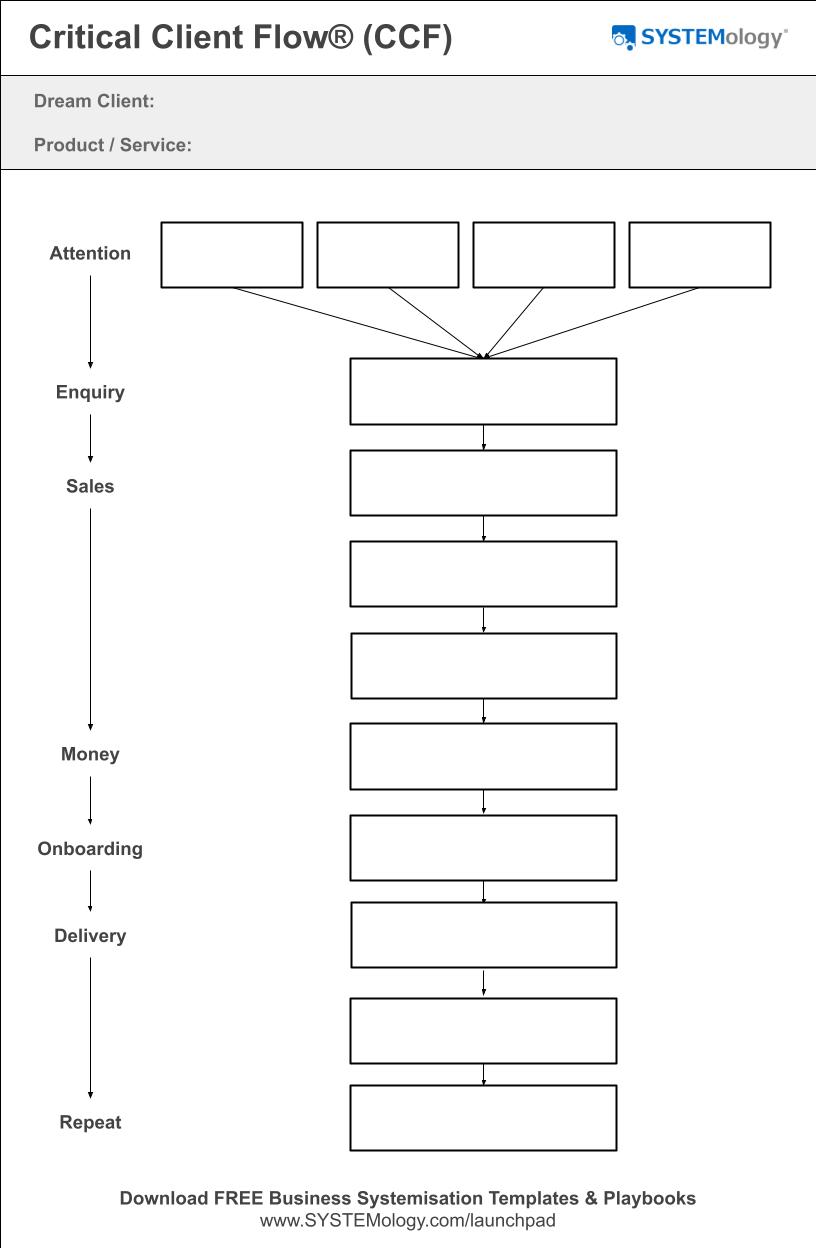
The Critical Client Flow Template.
The beauty of the CCF is that it gives you a bird’s-eye view before you dive into the details. Once you have the big picture, you can zoom into any stage and build detailed flowcharts or SOPs for the individual steps within it. You can learn more about building your CCF in our dedicated guide.
Best for: Getting the big-picture view of your entire business operation before documenting individual processes. This is where I recommend every business owner starts.
How to create your first business process diagram
You don’t need special software, a design degree, or weeks of planning. Here’s a straightforward, step-by-step approach to creating a business process diagram that your team will actually use.
1. Pick one process to map
Don’t try to map everything at once. Start with a single process — ideally one that’s client-facing and critical to your revenue. In SYSTEMology, we call this starting with “one client, one product, one journey.”
Good candidates include your client onboarding process, your sales follow-up sequence, or how you deliver your core product or service. Choose something that happens regularly and that you (or your team) could walk through from memory.
2. Identify the start and end points
Every process diagram needs a clear trigger (what kicks it off) and a clear endpoint (how you know it’s done). Without these boundaries, the diagram either becomes too vague or spirals into capturing everything.
For example: a client onboarding process might start with “Client signs contract” and end with “Client confirmed and project underway.” Simple.
3. List every step in order
Write down every action that happens between the start and end points. Don’t overthink it — two or three words per step is enough at this stage. You’re going for sequence, not detail.
I always recommend doing this on paper or a whiteboard first. There’s something about physically writing it out that helps you remember steps you’d otherwise skip. You can always digitise it later.
4. Identify who owns each step
Next to each step, write the name or role of the person responsible. This is where you’ll often spot problems. If one person’s name appears on nearly every step, you’ve found your bottleneck. If nobody’s name appears, you’ve found a step that falls through the cracks.
5. Draw it out
Now connect the steps visually. Use boxes for actions, arrows for flow, and diamonds for decision points (if any). Keep it clean. A messy diagram defeats the purpose.
You can use a whiteboard, a piece of paper, a digital tool like Miro or Lucidchart, or even a simple document. The tool doesn’t matter nearly as much as the act of making it visual.
6. Test it with someone outside the process
This is the step most people skip — and it’s the most important one. Show your diagram to someone who wasn’t involved in creating it. Ideally, someone who knows roughly what your business does but isn’t in the weeds of this particular process.
If they can follow the diagram without you having to explain every step, you’ve nailed it. If they look confused, simplify further. A process diagram should be self-explanatory.
7. Store it where your team can find it
A diagram buried in someone’s Google Drive or pinned to a whiteboard that’s since been erased helps nobody. Your process diagrams need a permanent, accessible home — somewhere your team can reference them daily.
This is where a dedicated business process management system makes all the difference. When your diagrams live alongside your SOPs, checklists, and training videos, they become part of how your team works — not just a one-time exercise.
Pro tip: Don’t aim for perfection on your first attempt. In SYSTEMology, we say “simple beats perfect.” Get the first version done, put it in front of your team, and refine from there. Momentum scales faster than mastery.
Ready to store your process diagrams where your team can actually use them?
systemHUB gives you a central home for your SOPs, process diagrams, and training — so nothing lives in someone’s head ever again.
Example: a simple client onboarding process diagram
Let’s put theory into practice. Here’s what a simple process diagram looks like for a common business workflow — client onboarding. This is the kind of diagram you could create in under 30 minutes.
Client Onboarding: Sample Process Diagram
Trigger: New client signs contract.
- Send welcome email — Account manager sends the welcome pack with expectations, timeline, and next steps.
- Schedule kickoff call — Coordinator books a 30-minute onboarding call within 48 hours.
- Create project in PM tool — Operations sets up the client workspace with tasks, deadlines, and assigned team members.
- Assign team members — Project lead assigns the delivery team based on scope and availability.
- Deliver onboarding pack — Send the client their login credentials, resource links, and getting-started guide.
- Confirm expectations — Kickoff call happens. Review scope, communication preferences, and milestones.
Endpoint: Client confirmed, project underway, and first milestone scheduled.
Notice how simple that is. Six steps. Clear ownership. A defined start and end point. You could hand this to a new team member and they’d know exactly what to do — and when.
Once you have a diagram like this, you can build detailed standard operating procedures for each step. The diagram is the map. The SOPs are the turn-by-turn directions.
Common mistakes when creating process diagrams
I’ve watched hundreds of business owners go through this exercise. Here are the traps that catch most of them.
Trying to map everything at once. The single biggest mistake. You get excited, pull out a whiteboard, and try to diagram your entire business in one sitting. It’s overwhelming and you’ll abandon it. Start with one process. Get a win. Then do the next one.
Going too detailed too soon. Your first diagram should be high-level — just the major steps. If you’re writing paragraphs inside each box, you’ve gone too deep. Keep each step to two or three words. You can always add detail later through SOPs and checklists.
Not involving the person who does the work. If you’re the business owner and you haven’t personally done this task in months (or years), don’t map it alone. The best process diagrams come from the person who walks the path every day. Sit with them and map it together.
Making it pretty but not useful. A rough sketch on a napkin that your team actually references is infinitely more valuable than a beautiful Visio diagram nobody opens. Focus on clarity and accessibility first. Polish later — if ever.
Forgetting to update it. Processes evolve. People change roles. Tools get replaced. If your diagram still reflects how you worked two years ago, it’s worse than having no diagram at all — because it creates false confidence. Review your process diagrams at least once a quarter.
Frequently asked questions
What is a business process diagram?
A business process diagram is a visual map that shows the steps, decisions, and handoffs involved in completing a specific business process. It turns an invisible workflow into something you can see, share, and improve. It’s sometimes called a process map, business process flowchart, or business process model.
What is the difference between a process diagram and a flowchart?
A flowchart is one type of process diagram. It uses shapes (boxes, diamonds, arrows) to show a linear sequence of steps. A process diagram is a broader term that includes flowcharts, swimlane diagrams, value stream maps, and frameworks like the Critical Client Flow. Think of “flowchart” as a subset of “process diagram.”
What tools can I use to create a business process diagram?
You can start with a whiteboard, sticky notes, or plain paper — and honestly, that’s often the best way to begin. For digital versions, popular tools include Miro, Lucidchart, Microsoft Visio, and draw.io. For storing and managing your finished diagrams alongside your SOPs, a platform like systemHUB keeps everything in one place for your team.
How many steps should a process diagram have?
For a high-level business process diagram like a Critical Client Flow, aim for 7 to 12 steps. For an individual SOP-level flowchart, you might have 5 to 15 steps. If your diagram has more than 15 steps, you’re probably going too granular — consider breaking it into sub-processes.
Who should create the process diagram?
Ideally, the person who performs the process every day — your “knowledgeable worker” — should be involved. They know the real steps, including the workarounds and nuances that a manager might miss. In the SYSTEMology framework, we pair the knowledgeable worker with a systems champion who guides the documentation.
How often should I update my process diagrams?
Review your process diagrams at least once per quarter. Update them whenever a process changes significantly — new tools, new team members, new steps. An outdated diagram is worse than no diagram because people trust it without realising it’s wrong.
What is a Critical Client Flow?
The Critical Client Flow (CCF) is a business process diagram developed as part of the SYSTEMology framework. It maps the 7 to 12 core stages your business goes through to deliver value to a client — from how they first discover you through to repeat business or referrals. It’s designed to give you a bird’s-eye view of your entire operation before you drill into the detail of individual systems.
Can I use process diagrams for small businesses?
Absolutely — and small businesses often benefit the most. In a larger company, processes are usually documented (at least partly) by default. In a small business, most processes live in people’s heads. That makes you incredibly vulnerable to key person dependency. A process diagram is the fastest way to get that knowledge out of heads and into a format anyone can follow. You don’t need to be a big company to systemise your business.
The best time to diagram your processes was years ago. The second best time is today.
You don’t need to map every process in your business right now. Start with one. Pick the process that’s most critical to your clients, draw it out, and share it with your team. That one diagram will show you more about how your business actually works than months of meetings and discussions.
If you’re ready to go deeper, grab a copy of the SYSTEMology book to learn the complete framework for building your Critical Client Flow and documenting the systems that run your business. And when you’re ready to store those diagrams and SOPs in a central hub your team can access every day, check out systemHUB.