Short answer: Project management software tracks who’s doing what by when. SOP management software documents how the work actually gets done. Different jobs. You need both, and they should sit separately so neither compromises the other. This page shows you the difference, where each one wins, and the cleanest way to run both at once.
On this page
- The trap most owners fall into
- What project management software is
- What SOP management software is
- Side by side
- The round peg, square hole problem
- Why integrated all-in-one tools usually fail
- How both tools work together
- Good project management options
- Good SOP management options
- How to know which half you’re missing
- FAQ
The trap most owners fall into
A growing business owner Googles “best software to manage my business processes.” Up come Asana, Notion, Trello, Trainual, ClickUp, Monday, Process Street. The list mixes two completely different kinds of tool, and the owner picks one, rolls it out, and hopes it covers everything.
Six months later, one of two things has happened. Either the team is using a project management tool as a poor substitute for SOPs (master templates with attachments and videos crammed into a task description that nobody reads), or they’re using an SOP tool to try to run the day-to-day work (a beautiful library of documented systems with no idea who’s supposed to do what today).
Both outcomes feel like the software is failing. The software isn’t failing. The wrong category of tool was picked for the job. This is the most common operational software mistake I see in growing businesses, and it costs more in lost productivity than the software itself.
What project management software is
Project management software answers three questions on a continuous basis: what needs to be done, who’s doing it, and when it’s due. It’s the accountability layer of your operations. Tasks get created, assigned, scheduled, tracked, completed, archived.
Good project management software handles things like:
- Task and sub-task creation with assignment and due dates
- Templates for recurring projects (so you don’t rebuild the same task list every Monday)
- Status tracking across departments
- Permissions and visibility so the right people see the right work
- Integration with the tools your team already uses (calendar, chat, email)
It is not built to be a reference manual for how each task should be done. It’s built to be a scheduler for the work.
What SOP management software is
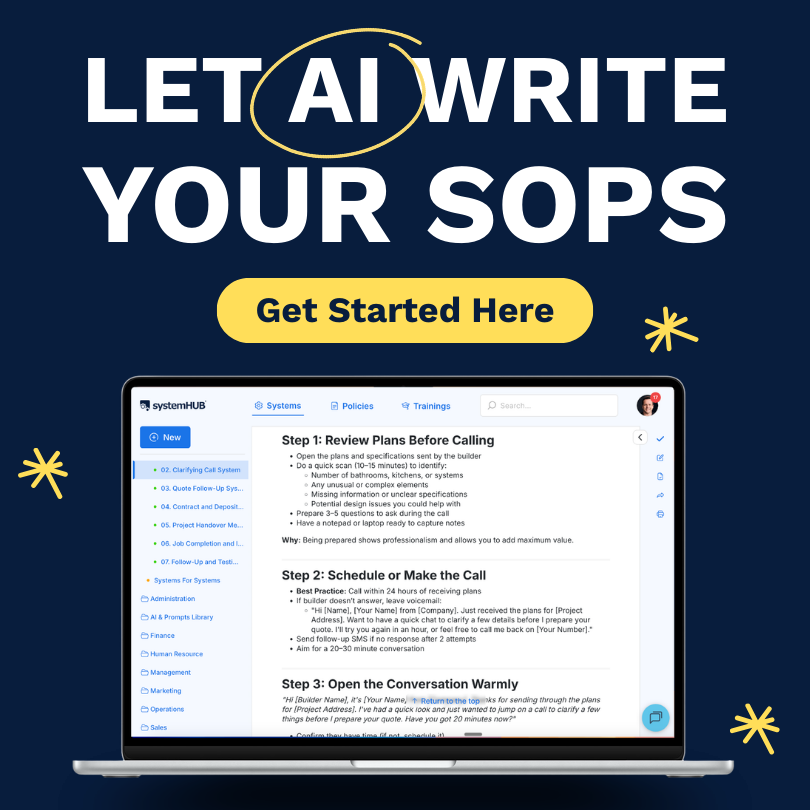
SOP (Standard Operating Procedure) management software answers a different question: how is this task done. It’s the reference layer of your operations. Documented systems, step-by-step procedures, walkthrough videos, checklists, sign-off records.
Good SOP management software handles things like:
- Dedicated structure for systems, not generic files
- Rich media inline (videos, images, attachments, links)
- Role-based permissions so the warehouse system doesn’t show up for the finance team
- Sign-off so team members confirm they’ve read and understood a system
- Templates so common processes don’t get rebuilt from scratch
- Search that lets a new hire find a system in seconds
It is not built to track who’s doing what today. It’s built to be the source of truth for how the work happens.
Side by side
| Dimension | Project management software | SOP management software |
|---|---|---|
| Primary question | What needs to be done, by whom, by when? | How is this task done? |
| Output | A scheduled, assigned, tracked task list | A library of documented systems the team follows |
| Cadence | Touched many times per day | Touched when a system needs to be created, learned, or updated |
| Who uses it most | Every team member, every day | New hires, the Systems Champion, anyone unsure how to do something |
| Time horizon | Today, this week, this sprint | The whole life of the business |
| Example tools | Asana, Trello, Monday, ClickUp, Basecamp, Teamwork | systemHUB, Trainual, SweetProcess, Process Street, Scribe, Notion |
| What goes wrong if missing | Tasks fall through the cracks, deadlines slip, accountability dissolves | Knowledge stays in people’s heads, new hires take months to ramp, the owner stays in the bottleneck |
The round peg, square hole problem
The most common mistake is forcing one tool to do the other’s job. It looks reasonable on day one. You’re already using Asana, why not just put your SOPs in the task descriptions? You’re already using Trainual, why not run today’s tasks out of it too?
It doesn’t hold up.
Project management tools are built around the unit of the task. A task is short-lived, assigned to a person, has a due date, and gets archived when complete. SOPs are the opposite. They’re long-lived, owned by a role rather than a person, evergreen rather than dated, and they get updated rather than archived. When you cram an SOP into a task description, the SOP inherits all the wrong characteristics. It disappears when the task closes. It can’t be found by search. It has no version history. The next person looking for it has no idea it ever existed.
SOP tools have the opposite problem when you try to run daily work out of them. They’re built for documents, not for assignment and scheduling. There’s no clean way to say “Sarah needs to do this thing by Friday.” The system sits there, beautifully documented, completely disconnected from whether anyone is actually doing the work.
“Let project management tools manage your projects. Let SOP management software manage your system documentation. The confusion creates inefficiency, and inefficiency costs you time and money.”David Jenyns, founder of SYSTEMology
Why integrated all-in-one tools usually fail
The “all-in-one” platforms exist. Some pitch themselves as project management plus SOPs plus knowledge base plus wiki plus chat plus CRM. They sound efficient. One subscription, one login, one place for everything.
In practice the compromise usually breaks both halves. The project management features end up weaker than what a dedicated PM tool offers. The SOP features end up weaker than what a dedicated systems tool offers. You pay for breadth and lose depth. And when something does go wrong (a feature is missing, a workflow can’t be modelled, performance degrades), you can’t swap one half out without losing the other.
There are a few exceptions where an all-in-one is the right call. Very small teams where the depth doesn’t matter yet. Solo founders. Pre-product-market-fit experiments. But for any team past about 10 people that’s serious about getting work done predictably, two dedicated tools beats one half-baked one almost every time.
You’ll also reduce the likelihood of needing to switch software further down the road. And if you ever sell your business, an acquirer expects to see the separation. It’s what serious operations look like.
How both tools work together
Here’s the practical setup. This is how teams that get the most out of both tools actually wire them together.
Document the system in your SOP tool
Your Systems Champion or knowledgeable worker writes the step-by-step process. Video walkthrough, supporting attachments, sign-off enabled. The system lives in the SOP tool from now on and gets edited there as the process evolves.
Create the task in your project management tool
When someone has to actually do the work, a task is created in the PM tool. Assignee, due date, sub-tasks (drawn from the system’s steps), the works.
Link the system into the task description
The task description in your PM tool contains a direct link to the relevant system in your SOP tool. One click and the team member is reading the how-to. This is the connective tissue between the two tools. Don’t skip it.
Use task templates so the link doesn’t have to be added every time
If a task repeats (and most do), save it as a template with the SOP link baked in. New instances of the task automatically include the link. You’re not pasting URLs every week.
Track completion in PM, evolve the system in SOP
The PM tool records that the task was done, by whom, on what date. The SOP tool gets updated as you learn better ways to do the work. Each tool keeps doing its job. Neither tool gets bloated with the other’s responsibilities.
That’s the model. Two tools, one clean integration, no compromises on either side.
Good project management options
There are dozens of solid project management tools. If you already have one that’s working, don’t switch. If you’re starting fresh, six worth considering:
- Asana. The most widely-used general-purpose PM tool. Strong on task and sub-task management. Reasonable free tier.
- Trello. Kanban-board-first. Best for teams that think visually about their work in columns and cards.
- Monday.com. Heavy on customisation and views. Strong for teams who want to model their workflow themselves.
- ClickUp. Feature-rich. Sometimes too feature-rich, but it does what you need.
- Basecamp. Opinionated, simple, low-feature. Strong if your team wants less software, not more.
- Teamwork. Solid for client services and agency-style work where billable time matters.
All six handle the fundamentals (task creation, assignment, deadlines, sub-tasks, templates, permissions). Pick based on how your team actually thinks about work.
Good SOP management options
The SOP side has fewer purpose-built options than PM but more than enough to choose from. Seven worth knowing:
- systemHUB. Our platform. Built specifically to operationalise the SYSTEMology framework. Strong on the full criteria list in our buying guide.
- Trainual. Onboarding and training focus. Solid for medium-sized teams with structured curriculums.
- SweetProcess. Purpose-built SOP software. Often the first dedicated tool small teams move to from Google Docs.
- Process Street. Workflow execution and recurring checklists. Strong if your processes are run-on-rails routines.
- Scribe. Capture-first. Brilliant for documenting software-driven tasks via screen recording.
- Tango. Similar to Scribe. Clean, lightweight, free tier available.
- Notion. Flexible, cheap, can be shaped into an SOP tool. Many small teams start here.
For the deeper criteria comparison (and the case for why the tool’s job is the SOP, not just storage), see the SOP software buying guide.
How to know which half you’re missing
If you’re not sure where you’re weak, here are the symptoms.
You’re missing project management software if…
Things slip through the cracks. The same task gets done twice or not at all. Status updates happen in Slack threads that scroll away. Nobody can answer “what’s the team working on today” without a meeting. Deadlines are calendar invites that don’t connect to the work itself.
You’re missing SOP management software if…
New hires take months to ramp. The same questions get asked over and over. Knowledge lives in one person’s head, and you’re nervous about that person taking leave. “How do we do this?” gets answered by Slack-pinging whoever did it last time. You’ve documented things in Google Docs but nobody can find anything.
If you recognised both lists, you’re missing both. If you recognised one, that’s your next add. Either way, the goal isn’t to fold both jobs into one tool. It’s to get each job into the right tool, with a clean link between them.
Get the SOP half of the stack right
systemHUB pairs cleanly with whatever project management tool you already use. Free trial, no credit card.
FAQ
Can I just use Asana (or ClickUp or Monday) for everything?
Technically yes. Operationally no. You can shove SOPs into task descriptions and call it a system, but you’ll get all the symptoms above (knowledge stuck in tasks that archive, no search, no version history, new hires confused). The tool wasn’t built for it. Use Asana for what Asana’s good at and add a dedicated SOP tool for the SOPs.
Can I just use Notion (or Trainual) for everything?
Same answer in reverse. Notion can sort-of handle scheduled work via databases, and Trainual has some assignment features, but neither will give you the daily project management experience a dedicated PM tool delivers. The team won’t adopt it for daily task management the way they would adopt Asana, Trello, or Monday.
Doesn’t ClickUp claim to do both?
It does. So does Notion. So do several others. The all-in-one promise is real but the depth on each side is usually shallow. For very small teams (under 10) where neither half is heavy yet, an all-in-one can be enough. For teams past 10 staff that need both halves to perform, two dedicated tools almost always beats one bigger one.
How should the two tools talk to each other?
The simplest integration is also the most reliable: put the URL of the relevant SOP into the description of the corresponding task in your project management tool. One link, one click, no Zapier needed. If you want to get fancy later, both categories of tool have APIs and most integrate with Zapier or n8n.
What’s the cheapest way to run both?
For a 10-person team, expect a combined monthly bill in the $150-$250 range. A project management tool like Trello, Asana, or Basecamp at $5-$15 per user per month, plus a dedicated SOP tool like systemHUB at $95-$195 per month for the team plan. Both together cost less than most teams spend on incidental SaaS that delivers a fraction of the return.
Do I really need both, or can I start with one?
If you have to start with one, start with whichever half you’re more missing. Most fast-growing teams are missing the SOP side first because they instinctively buy a PM tool early. If you already have Asana or Trello in place, the SOP tool is usually the bigger gap to fill.
Key takeaways
- ✓Project management = what, who, when. SOP management = how. Different questions, different tools.
- ✓Round peg, square hole. Forcing one tool to do the other’s job almost always backfires.
- ✓All-in-one platforms usually compromise both halves. Use two dedicated tools for any team past 10 staff.
- ✓Connect them with one link. Put the SOP URL in the PM task description. That’s the integration most teams need.
- ✓Most growing teams are missing the SOP half first. If you have one already, that’s usually Asana or similar. Add the SOP tool next.