Full disclosure: systemHUB is my software, so I have a stake in what you choose. This guide is about how to choose, not which brand to buy, and the criteria hold whichever tool you end up with.
Short answer: Most SOP software gets paid for and never used. Picking the right tool means understanding you actually need two tools (a systems management tool and a project management tool), keeping both simple enough that the team will actually use them, and accepting that software alone won’t get you to a systems-run business. You need a framework and a community around it too. This guide walks you through the choice.
On this page
The trap most owners fall into
The single most expensive mistake I see business owners make when they go shopping for SOP software: they pick the tool with the longest comparison-page tick list.
They see fifty features. They imagine using all fifty. They sign up. They roll it out. The team takes one look at the dashboard, doesn’t know where to start, and quietly goes back to asking colleagues for help over Slack. Three months later, the subscription is still ticking over. The dashboard is empty. Nobody uses it. The owner blames the team. The team blames the tool. Both are wrong. The tool was wrong for the team.
I’ve been teaching business systemisation for more than a decade. I’ve watched hundreds of companies adopt and abandon SOP software. The pattern is consistent. The teams that succeed don’t buy more feature-rich tools. They buy the right kind of tool, keep it simple, and surround it with the things software alone can’t provide.

This guide walks you through what to actually look for. It draws on the “Organise” chapter from my book SYSTEMology, which has been the playbook for thousands of small and mid-sized businesses building systems-run companies. Skip past the listicles ranking ten tools they conveniently profit from. Start here.
Where do you think most companies store their systems?
Before we get to what to look for, look around at what’s actually happening in most businesses today. Where do their systems actually live?
Scattered. They’re on people’s desktops. Some are in Dropbox. Others are in Google Drive or SharePoint. Some are stored in Microsoft Word files, others in text files. A handful of teams have a wiki, or a WordPress plugin, or a Google Sites page that one person started and nobody else touches.
“If they’re everywhere, that really means they’re nowhere.”David Jenyns, author of SYSTEMology
That’s the starting point for most owners reading this. You’re not picking SOP software because nothing exists. You’re picking it because what exists has become an unfindable mess. The real job of an SOP tool is to fix the chaos by giving every system one home that the whole team knows how to use.
Why you’re asking the wrong question
Almost every comparison article you’ll read frames the question as: which SOP tool is best? That framing is wrong because it assumes one tool will do the job.
It won’t. You need two.
1. Systems management software
The central location where your systems live. The how-to manual for every role and every task, documented and stored in one place. This is where the team goes to learn how something is done.
2. Project management software
The accountability tool. Who’s doing what, by when. Tasks get assigned, sub-tasks get checked off, deadlines get tracked. This is where the team goes to do the work.
The two tools answer different questions. How is this done? belongs in systems management. Who’s doing it and when’s it due? belongs in project management. They’re complementary, not competing.
And critically: I’d argue you shouldn’t combine them. Integrated all-in-one solutions exist, and they sound efficient, but combining the two jobs usually means compromises on both. You end up with a project management tool that does systems badly, or a systems tool that does projects badly. Keep them separate. You’ll switch software less often and your business will sell for more if you ever exit, because the separation is what an acquirer expects to see.
The rest of this guide focuses on the systems management half of the pair. Choosing project management software is a different conversation. If yours works (Asana, Basecamp, Trello, Monday, ClickUp, Teamwork. There are dozens of solid options) don’t switch. The point of this article is the SOP tool you sit next to it.
The 5 criteria for choosing SOP software
If you don’t have a dedicated systems management tool yet, these are the criteria that matter. Score any tool you’re considering against this list.
Built for systems, not files
Avoid storing your systems in document or file storage platforms like Dropbox, Google Drive, Box, or SharePoint. These quickly become an unorganised mess of random folders, files, and inconsistency. They’re built for storing things. Systems software is built for following things.
Also avoid wiki-style platforms that need coding, HTML, or special knowledge to use. Anything with a steep learning curve will get used by two people on the team and ignored by the other twenty. To build a systems culture, you want the whole team to buy in. The tool has to be friendly to whoever you’d hire tomorrow.
Attaches rich media inline
Systems live and die by clarity. A walkthrough video, an example email, a flowchart, a screenshot, an audio clip. All of it should embed directly into the system page. If your team has to download a video or open a separate app to see the example, friction kills adoption.
The best tools let you upload video directly, or embed from YouTube/Wistia/Vimeo, and stream it on the page without leaving the system.
Real permission levels
Not every system needs to be visible to every team member. The finance system isn’t for the warehouse staff. The HR sensitive-cases handling isn’t for everyone. You need to assign systems to roles, and roles to individuals, so people see what they need and nothing else.
This is also one of the most common features missing in non-dedicated platforms. If your tool can’t do role-based permissions cleanly, it’s not built for what you need.
Sign-off
The “I didn’t know” excuse kills more SOP rollouts than any other single problem. The fix is a sign-off feature. Team members read a system, click a button, and agree they’ve read and understood it. Now you have a record. Now the excuse evaporates.
Be sure your systems management software has this. Without it, you’re building accountability on goodwill, and goodwill runs out.
Intuitive enough to need zero training
If using your SOP tool requires a training session before the team can find a system, you’ve already lost. Good systems management software should look and work in a way your team already finds familiar. They should open it and figure it out in minutes.
Avoid excessive features that overlap with what your project management software does. Automated workflows, active checklists, data collection. These are often pitched as bonus features but they belong in your project management tool, not here. The systems tool’s job is to be the reference manual. Keep it focused.
“Unneeded features create complexity, complexity creates friction, and friction lowers adoption.”David Jenyns, author of SYSTEMology
Why simple wins
This is the most underrated principle in the entire SOP software conversation. The tool no one uses is worse than no tool at all, because you’ve now added a recurring expense and a layer of guilt on top of the original chaos.
If you can’t master the simple, you’ll never master the complex. So before chasing the latest, greatest, shiny features, agree to keep things simple.
Practical test: if a new hire on their first day can’t find an SOP and follow it in under two minutes, the tool is too complex. If the team member documenting a system has to think about which of five dropdown menus to use, the tool is too complex. If you, the owner, need to read documentation to set the tool up, it’s too complex.
Simplicity isn’t a feature you can buy. It’s a constraint you have to impose. Pick the tool that solves the core job, ignore the bonus features, and resist the temptation to expand into the full capability set just because it’s there.
Get a head start with proven templates
Don’t build your systems from a blank page. 100+ ready-made SOP templates across sales, ops, HR, finance, and marketing. Free to download.
The bigger truth: even the right tools won’t save you alone
This is where most SOP-software buying guides stop and where the useful conversation starts.
I’ve watched businesses buy the right two tools, follow the criteria above to the letter, roll the tools out cleanly, and still fail to become systems-run businesses. Why? Because software is one ingredient of three. The other two are a methodology and a community. Skip either and the software becomes a dashboard nobody opens.
You need a methodology, not just a tool
A tool is a place to store systems. It’s not a method for creating them, prioritising them, sequencing them, or getting the team to adopt them. That’s the work that happens around the software, and most owners underestimate how much of it there is.
This is what SYSTEMology is. A proven seven-stage framework, tested across thousands of small and mid-sized businesses in dozens of industries, that walks you through Define, Assign, Extract, Organise, Integrate, Scale, and Optimise. You can buy systemHUB without ever reading the book and the platform will work fine as software. But you won’t build a systems-run business. The framework is the missing layer.
It isn’t a new argument, either. Michael E. Gerber made the case in The E-Myth Revisited decades before I wrote SYSTEMology, and he eventually wrote the foreword to my book. The thread is the same: software is the tool. The system is the thing the software serves.
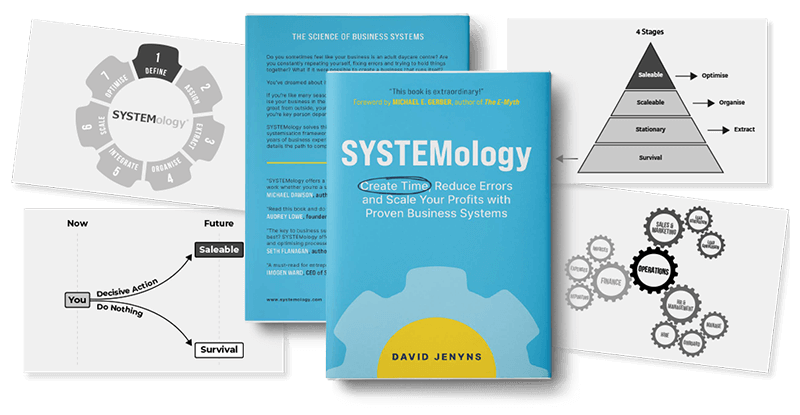
★★★★★ Amazon Rating 4.6
You need people in the trenches with you
The single most important hire most growing businesses can make is a Systems Champion. That’s the person on your team whose dedicated job is to extract systems from your knowledgeable workers, document them, and drive adoption. It isn’t the owner. It isn’t the COO. It’s a role with its own playbook, and getting it right transforms whether your software gets used.
And it isn’t just an internal role. There’s a community of certified SYSTEMologists around the world who do this work for a living, a Systems Champion Academy that trains the role on your team, and a regular drumbeat of case studies, podcasts, and live events that keep the practice front-of-mind for owners who would otherwise let it slide.
You can replicate none of this by switching SOP tools. None of the competitor platforms in the SERP have it. It’s why owners using the SYSTEMology approach with systemHUB get further than owners using any other SOP tool with nothing surrounding it.
How to make the final decision
Once you’ve shortlisted one tool for each side (systems mgmt and project mgmt), don’t sign up alone in your office and roll it out top-down. Run a small test first.
Pick three or four team members across different roles. Give them a free trial. Ask them to run two or three real tasks through the platform. Watch them use it. Listen to their feedback. Don’t expect ringing endorsements from everyone, but pay attention to friction. Where do they get stuck? What do they avoid clicking on? What confuses them?
The tool that wins isn’t the one with the best demo. It’s the one your team adopts without complaint. That’s almost always the simpler one.
A case in point
Stannard Family Homes scaled to $15M in revenue and Ryan Stannard now takes seven-week holidays while the business runs without him. The shift came from systemising the work using systemHUB plus a focused project management stack. Read the full case study →
How systemHUB and SYSTEMology fit
Honest positioning: systemHUB’s SOP software is the systems management half of the equation. It was purpose-built to meet every criterion in this guide. It’s not trying to be your project management tool too, which is why it pairs cleanly with Asana, Trello, Monday, or whatever you already use for the “who does what by when” side.
And it doesn’t sit alone. Behind the platform is the SYSTEMology framework, a certified consultant network, the Systems Champion Academy, ready-made templates, AI-assisted SOP creation, and a body of work that’s been refining the practice of business systemisation for more than a decade.
You can trial systemHUB free for fourteen days. The platform will explain itself in minutes. The framework and the community are what make it stick.
Watch the free masterclass: building SOPs fast with AI and systemHUB.
See it in action
systemHUB is built around every criterion in this guide. Score it against your shortlist with a free trial. No credit card required.
FAQ
What’s the difference between SOP software and project management software?
SOP software (also called systems management software) is where the how lives. Step-by-step instructions, walkthrough videos, sign-off records. It’s the manual. Project management software is where the when lives. Who’s doing the task, what the sub-steps are, what the deadline is. It’s the scheduler. You need both. They do different jobs, and trying to do one job with the other tool always compromises.
Can’t I just use Google Drive or Dropbox for SOPs?
You can start there. Most businesses do. But these tools are built for file storage, not for following processes. You’ll quickly hit issues: SOPs get scattered across folders no one can find, there’s no way to know if anyone actually read them, no sign-off, no role-based access. By the time you have five team members and twenty SOPs, the chaos costs you more than dedicated software would. The signal to switch is usually when a new hire takes longer to find an SOP than to ask a colleague.
How much should small businesses pay for SOP software?
For most small businesses (5-30 staff), expect to pay somewhere between $50 and $300 per month for a dedicated systems management tool. Anything cheaper usually means you’re paying for file storage with an SOP wrapper. Anything much more usually means enterprise features you’ll never use. Project management tools sit in a similar range. Both together should fit comfortably inside your software budget if your team is small to mid-sized.
How long does it take to roll out new SOP software across a team?
If you’ve picked a properly simple tool, the platform itself takes about a week to learn and start using. The systems work that fills it takes much longer. Typically three to six months to document the core processes that run your business, and then ongoing work as the business evolves. Most owners underestimate the second part and pick tools based only on the first.
What kills SOP software rollouts in small businesses?
Three things, in order. First, picking a tool too complex for the team. Second, no one owns the role of documenting and championing systems (the Systems Champion gap). Third, treating it as a software project instead of a culture change. Software is the easy part. The framework and the human discipline around it are what determine whether you end up with a working systems-run business or a paid-up subscription nobody opens.
Key takeaways
- ✓You need two tools, not one. Systems management for the how, project management for the when.
- ✓Keep both simple. The tool nobody uses is worse than no tool.
- ✓Test with the team before committing. The right tool is the one your team actually adopts.
- ✓Software is one ingredient of three. You also need a methodology and a community around it.
- ✓The Systems Champion role is the single most important hire for making any SOP rollout stick.