What separates a business that scales from one that stalls? One word: systems.
Not just any systems. Proven business systems. The kind that have been tested under pressure, refined through real-world use, and deliver consistent results no matter who runs them.
Think about the businesses you admire. McDonald’s. 1-800-GOT-JUNK. Your local tradie who somehow manages to take holidays while the business keeps humming. They all share something in common. Their success isn’t locked inside one person’s head. It lives inside their systems.
The good news? You don’t need to be a franchise giant to build proven systems. You just need a framework that works. In this guide, you’ll see exactly how real business owners have done it, and how you can start today.
In this guide:
- What makes a business system “proven”
- Why proven systems matter more than talent alone
- Proven systems from real businesses
- 8 types of business systems every company needs
- The SYSTEMology framework for building proven systems
- How to build your first proven system today
- Common mistakes when building business systems
- Frequently asked questions
What makes a business system “proven”?
Every business has processes. But not every process qualifies as a proven system.
A proven business system is a documented, repeatable process that delivers consistent results regardless of who executes it. It has been tested in real conditions, refined based on feedback, and produces reliable outcomes every time.
Here’s the simplest test: if your best employee left tomorrow, could someone else step in and deliver the same quality? If the answer is yes, you have a proven system. If the answer is no, you have tribal knowledge trapped in someone’s head.
The four stages of business systemisation.
In SYSTEMology, businesses progress through four distinct stages as they build proven systems:
- Survival: The owner does everything. No systems exist. Performance is lumpy and unpredictable.
- Stationary: Some loose processes exist but they’re trapped in people’s heads. The business feels stuck.
- Scalable: Core systems are documented. The team follows them. Consistency improves dramatically.
- Saleable: The business runs like clockwork. It operates without the owner and becomes a valuable, sellable asset.
Most business owners sit somewhere between Survival and Stationary. Proven systems are what move you to Scalable and beyond.
The difference between a “good idea” and a proven system comes down to three things. First, it’s documented clearly enough that someone new can follow it. Second, it’s been used successfully more than once. Third, it produces measurable, consistent outcomes.
When your business uses systems like these, you stop relying on individual talent and start building something that works without you.
Why proven systems matter more than talent alone
Most business owners believe that hiring great people is the answer to growth. And great people certainly help. But here’s the uncomfortable truth: if your business depends on specific individuals to function, you don’t have a business. You have a job that employs other people.
Proven business systems change the equation entirely. Here’s why.
They remove key person dependency
No single employee should be so critical to your business that they’re irreplaceable. If they get sick, take leave, or resign, your business shouldn’t grind to a halt. Proven systems capture what your best people know and make that knowledge available to everyone. The system becomes the star, not the individual.
They create consistency across your team
Without systems, every team member invents their own way of doing things. One person handles customer enquiries brilliantly. Another fumbles through the same process. Proven systems establish “this is how we do things here” and ensure every customer gets the same great experience. Every time.
They make your business scalable
You can’t scale chaos. If growing your team means spending weeks training each new hire, personally supervising their work, and fixing their mistakes, you’ll hit a ceiling fast. Proven systems let you systemise your business so new people can get up to speed quickly and deliver results from day one.
They increase the value of your business
A systems-run business is always worth more. Buyers and investors look for businesses that function without the owner. Your documented systems are the blueprint to your successfully run business. They prove the business can keep performing after the sale. One enterprising businessman has built and sold his plumbing business twenty-one times, each time deploying his proven systems to turn a failing operation into a valuable asset.
They give you back your freedom
This is the one that matters most. Proven systems free you from the daily grind. Instead of answering the same questions, solving the same problems, and being the bottleneck in every decision, you can step back. Work on the business instead of in it. Take a holiday without your phone buzzing every five minutes.

The old way: everything runs through the owner.

The SYSTEMology way: your team runs the systems, you run the business.
The contrast is clear. In the old model, every task, question, and decision flows through the business owner. In a systems-driven business, the team follows proven processes. The owner leads strategy, not firefighting.
Not sure where your systems stand?
Take the free Systems Strength Test and discover how your business compares. It takes less than 3 minutes.
Proven systems from real businesses
Theory is useful. But nothing beats seeing proven business systems in action. Here are four real examples of business owners who built systems that transformed their companies.
Ecosystem Solutions: From 100-hour weeks to peace of mind
Gary McMahon founded Ecosystem Solutions, an ecological consulting firm, in 2005. Demand grew fast, but so did Gary’s workload. He was logging 100 to 110 hours per week. His health suffered. His family relationships suffered. Every tool and training program he tried failed to solve the problem.
When Gary discovered SYSTEMology, he started with the Critical Client Flow (CCF) to map out his core business processes. He called the CCF a “game changer” because it let him and his team visualise exactly where the bottlenecks were.
The results? Profitability increased approximately 80 per cent. And Gary took a three-week holiday with his family for the first time in his entire working life.
When asked what a systemised business means to him, Gary said: “Peace of mind. It’s like I’ve lost fifty kilos. And I’ve got a life.”
Lime Therapy: A business built to run without its founder
Renee Kelly built Lime Therapy into a 40-person allied health clinic across rural and remote Australia on vision and instinct. The business grew, but the systems didn’t keep pace. Renee and her husband Matt had invested in policies — but they sat in a folder, unused.
The breakthrough came when they identified a Systems Champion inside the team: Kaleb, a junior team member with no management title. He drove the documentation, starting with invoicing, and SYSTEMology became part of how the whole team worked.
Invoicing time dropped by a factor of ten. Renee and Matt stepped back from daily operations, trusting the team and the systems to run the business. When Lime Therapy was later acquired, the buyer didn’t need Renee tied in for years post-sale — the systems meant the business didn’t depend on her.
The proven system at work: The Systems Champion didn’t need to be a manager to drive change. They needed clarity on what to document and permission to lead it.

Renee Kelly, founder of Lime Therapy. A Systems Champion outside the leadership team turned policies on a shelf into a business that no longer depends on its founder.
DiggiddyDoggyDaycare: Systemised, then sold for a premium
Jeanette Farren ran DiggiddyDoggyDaycare, a business that had grown to serve over 2,000 dogs. After 13 years, she was exhausted and wanted to exit. The problem? Her systems were “all over the place,” making it difficult for staff to access or improve procedures.
After attending a SYSTEMology workshop, Jeanette documented her Critical Client Flow and organised everything in systemHUB. She transitioned from working long hours “in” the business to working “on” the business, then stepped out of daily operations completely.
The business became so well-systemised that it attracted corporate buyers. DiggiddyDoggyDaycare was successfully sold to PETstock in 2019 for a high multiple of profit. The proven systems weren’t just operational tools. They were the asset that made the sale possible.
Planet 13: A franchise built on a simple binder
Before SYSTEMology existed, David Jenyns co-owned Planet 13, a rock ‘n’ roll-inspired clothing store. From day one, the goal wasn’t just to sell T-shirts. It was to build a business designed to franchise.
The first store was the prototype. David and his partners created, tested, and refined every process. They developed a manual that detailed every step of how to run a successful store. When it came time to sell the first franchise, David wasn’t selling clothes. He was selling proven systems.
The systems weren’t stored in fancy software or cloud platforms. They were printed and stored in a simple binder. One manual for store team members. One manual for the store owner. Simple. And it worked.
The lesson: Proven business systems don’t require expensive technology. They require clarity, consistency, and the discipline to document what works.
These aren’t theoretical examples. They’re real businesses, run by real people, who built repeatable processes that transformed their operations and their lives.
8 types of business systems every company needs
Proven systems aren’t abstract. They cover specific, recurring parts of how your business runs. If you’re not sure where to start, these are the systems most businesses build first.
- Client qualification system. A documented process for deciding who you take on before you say yes — qualifying criteria, an intake process, and a clear way to decline a bad-fit prospect.
- Client onboarding system. The process that takes a new client from “signed” to “fully set up,” so every client gets the same consistent, professional start.
- Lead generation and marketing system. A repeatable process for attracting new prospects, documented well enough that someone other than you can run it.
- Customer service system. A defined process for how a complaint gets received, escalated, resolved and closed — so resolution quality doesn’t depend on who picks up the call.
- Recruitment system. A documented, end-to-end hiring process with consistent criteria for what makes a good hire, so you can delegate most of it.
- Financial reporting system. A regular, owned process for reviewing the numbers that matter — revenue, cash position, margins — so problems surface before they become crises.
- Service delivery system. The core process for actually delivering your product or service to a consistent standard, regardless of who’s doing the work.
- Team knowledge and training system. A documented process for capturing what your best people know and making it accessible, so the business doesn’t lose a beat when someone leaves.
Start with the one causing you the most pain right now. Our free SOP templates give you a head start on any of these. Once you know which systems you need, see how they fit together in a business playbook.
The SYSTEMology framework for building proven systems
You’ve seen what proven systems look like in practice. Now let’s look at how to build them. The SYSTEMology framework breaks the process into seven clear stages. Each one builds on the last.
Define your Critical Client Flow (CCF)
You don’t need hundreds of systems to systemise your business. You need to identify the 10 to 15 that matter most. The Critical Client Flow maps the journey from how you first attract a client, through delivering your product or service, to turning them into a repeat customer. Start here. Everything else flows from this.
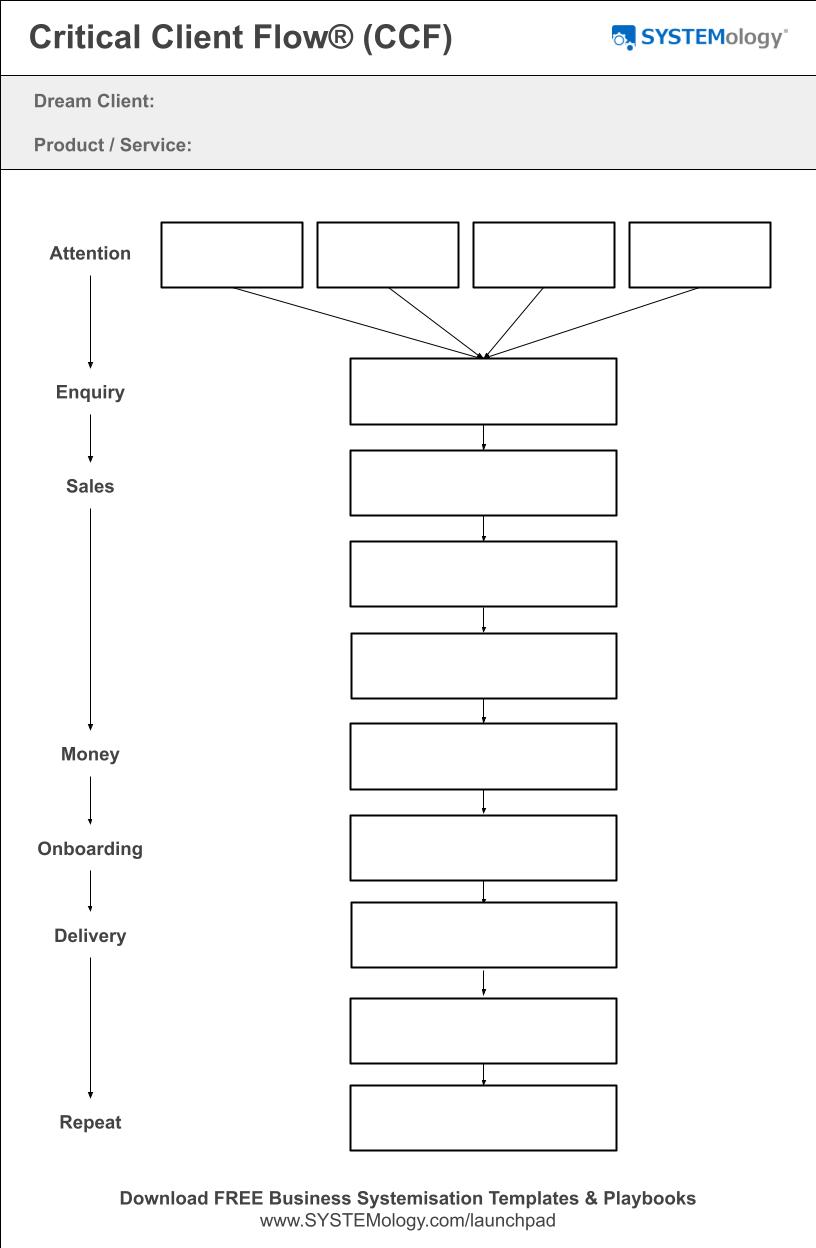
The Critical Client Flow (CCF) identifies the 10–15 critical systems in your business. It takes about twenty minutes to complete.
Assign responsibilities with the DRTC
The knowledge of how to do things well already exists within your team. The Departments, Responsibilities & Team Chart (DRTC) maps out who knows what. It identifies your “knowledgeable workers,” the people who do specific tasks best. Crucially, it takes the business owner out of the equation wherever possible. If you’re the only person who can do a task, there’s something wrong with the way your business is built.
Extract knowledge from your best people
This is where SYSTEMology differs from every other approach. Instead of asking your best people to sit down and write long, boring standard operating procedures, you make system creation a two-person job. One person (the knowledgeable worker) does what they already do while someone else (the systems champion) records and documents it. This eliminates resistance because nobody has to write anything from scratch. They just do their job while someone captures it.
Organise your systems in one central location
Scattered systems are useless systems. If your team doesn’t know where to find a process, they won’t follow it. Organise everything in a single, central hub. Not on desktops, not in random Dropbox folders, not in someone’s email. One place where every team member can find any system they need in seconds.
Integrate systems into daily operations
Building systems is one thing. Getting your team to actually follow them is another. This stage is about shifting the culture from “we have systems somewhere” to “this is how we do things here.” It involves onboarding new team members with systems from day one, assigning accountability, and making systems part of everyday work rather than a dusty manual nobody reads.
Scale across all departments
Once your core systems are working, it’s time to expand. Apply the same approach to every department: HR, finance, marketing, sales, management. The goal is complete business reliability. Your team handles operations. You focus on growth.
Optimise for continuous improvement
Proven systems aren’t set-and-forget. They evolve. This final stage introduces feedback loops, performance tracking, and ongoing refinement. The key is to start simple and improve over time rather than trying to create perfect systems from day one.
Tip: Don’t try to systemise everything at once. The SYSTEMology approach focuses on your Critical Client Flow first, the 10–15 systems that have the biggest impact. Get those right, and the rest follows naturally. See more popular business systems to understand which areas to tackle next.
How to build your first proven system today
You don’t need months of planning to start. You can build your first proven system this week. Here’s the practical, three-step process.
1
Pick your CCF
Identify one critical process your business depends on every day
2
Record the expert
Have your best person do the task while someone else records it
3
Document and test
Turn the recording into a step-by-step process, then have someone else follow it
Let’s walk through each step.
Step 1: Pick your Critical Client Flow
Download the CCF template and map out the key stages your clients go through. From how they first hear about you, through the sales process, delivery of your product or service, and follow-up. Focus on ONE target client and ONE primary product. Don’t overthink it. Two or three words to label each step is all you need.
Once you have the full flow mapped, look for the biggest bottleneck. That’s your first system to document.
Step 2: Record your best person doing it
Find the person on your team who does this task best. They’re your “knowledgeable worker.” Don’t ask them to write anything. Instead, have them do the task while someone else records it. This could be a screen recording, a video, or simply someone taking notes as they watch.
The recording doesn’t need to be perfect. It just needs to capture the steps, the decisions, and the little details that make the difference between good and great.
Tip: Assign a “systems champion” to drive this process. This is someone on your team who loves organisation and detail. They don’t need to be an expert in the task itself. They just need to be good at capturing and documenting. At Portavac, a 20-year-old named Kane grabbed a camera and went into the field to record how things were done. It produced outstanding results.
Step 3: Document, test, and refine
Take the recording and turn it into a clear, step-by-step written procedure. Keep it simple. Avoid flowcharts and excessive screenshots. Use plain language that anyone on your team can follow.
Then comes the real test. Have someone who has never done this task before follow the system. Watch where they get stuck. Note what’s unclear. Refine the document based on their feedback.
That’s it. You now have your first proven system. One that’s been documented, tested, and validated by someone other than the person who created it. Repeat this process for each system in your Critical Client Flow, and you’ll transform your business from owner-dependent to systems-driven.
Ready to build proven systems your team will actually follow?
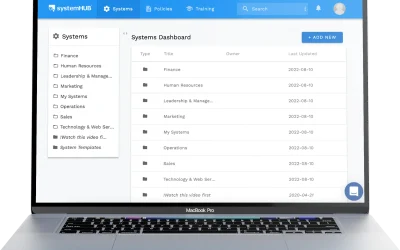
systemHUB gives you the tools, templates, and AI-powered features to document, organise, and manage your business systems in one central place.
Common mistakes when building business systems
Building proven systems is straightforward, but there are traps that catch business owners again and again. Here are the ones to watch for.
Trying to systemise like McDonald’s on day one. McDonald’s is the result of six decades of development. They’re an Olympic-level athlete in the sport of business systemisation. Trying to replicate their current level of sophistication before you even have a baseline is like a couch potato attempting an elite training regimen. Start with your Critical Client Flow and build from there. Don’t split-test the equivalent of “would you like fries with that” before you’ve documented your core processes.
Making the business owner create all the systems. This is the biggest resistance point. Business owners are busy. They’re also often the worst people to document systems because they skip steps they consider “obvious.” The SYSTEMology approach uses a two-person method. The knowledgeable worker demonstrates. The systems champion documents. Nobody has to write from a blank page.
Over-documenting with flowcharts and screenshots. Long, numbered lists with roman numeral sub-lists, hundreds of bullet points, and flowcharts nobody can edit. These are the systems that end up in a drawer, never to be read again. Keep your documentation simple, clear, and easy to update. A good system reads like a recipe, not a technical manual.
Not assigning a systems champion. Without someone to drive the process, systemisation stalls. You need a person on your team who takes ownership of building and maintaining your systems. They don’t need to be the most experienced person. They need to be organised, curious, and willing to follow through. Getting your team to love systems starts with finding the right champion.
Stopping at “good enough.” Many businesses reach the Scalable stage and think they’re done. They have most of their systems documented. Things are running reasonably well. But “good enough” is a trap. The biggest wins come when you move from “we have to follow process” to “this is how we do things here.” That cultural shift is what separates good businesses from great ones.
Frequently asked questions
What is a proven business system?
A proven business system is a documented, repeatable process that delivers consistent results regardless of who executes it. It has been tested in real conditions, refined based on feedback, and can be followed by any trained team member to achieve the same quality outcome. The key difference between a proven system and a rough process is reliability. A proven system works every time.
What are examples of proven business systems?
Examples include client onboarding workflows, sales follow-up sequences, quality control checklists, employee training programs, and service delivery processes. Any repeatable process that has been documented and validated qualifies. The SYSTEMology framework uses the Critical Client Flow (CCF) to identify the 10–15 most important systems in any business, covering everything from lead generation through to delivery and follow-up.
How do I know if my business systems are working?
The simplest test: can someone other than the person who created the system follow it and achieve the same result? If yes, your system works. Other indicators include consistent quality across team members, faster onboarding of new hires, fewer “how do I do this?” questions from staff, and the ability for the business owner to step away without operations suffering.
What is the Critical Client Flow (CCF)?
The Critical Client Flow is a SYSTEMology tool that maps the key stages your business goes through to deliver your core product or service. It covers everything from how you attract clients, through sales, delivery, and follow-up. Unlike a typical client journey map, the CCF also includes the internal business requirements needed at each stage. It takes about twenty minutes to complete and identifies the 10–15 most critical systems in your business.
How long does it take to systemise a business?
Most businesses can document their core Critical Client Flow systems within 90 days using the SYSTEMology approach. The full journey from Survival to Saleable takes longer, often 12 to 18 months. The key is to start with the most critical systems first and build momentum from there. You don’t need to systemise everything on day one. Focus on the systems that have the biggest impact and expand from there.
Do I need expensive software to build business systems?
No. David Jenyns built his first franchise (Planet 13) using systems stored in a simple printed binder. The key is having a central, accessible location where your team can find and follow your systems. While dedicated platforms like systemHUB make it easier to organise, collaborate, and maintain your systems at scale, you can start with whatever tools you have. The system matters more than the software.
What is a systems champion?
A systems champion is a team member who drives the process of documenting, organising, and maintaining your business systems. They don’t need to be the most experienced or senior person. They need to be organised, detail-oriented, and proactive. At Portavac, a 20-year-old named Kane took on the role and delivered outstanding results. At Lime Therapy, a junior team member with no management title, Kaleb, became the systems champion and drove documentation across the whole business.
Can proven systems work for small businesses?
Absolutely. In fact, small businesses benefit the most from proven systems because they have the least margin for error. The SYSTEMology framework was specifically designed for small to medium businesses with 10 to 50 employees. Whether you’re a tradie, a professional services firm, a retail operation, or an e-commerce business, the same principles apply. Identify your critical systems, document them simply, and get your team following them consistently.
Your business already has proven systems. They’re just trapped in the heads of your best people. It’s time to get them out.
The businesses that scale, the ones that give their owners true freedom, all share one thing: documented, repeatable systems that work without the founder standing over everyone’s shoulder. Whether you start with a binder or a platform like systemHUB, the important thing is to start. Pick one system. Document it. Test it. Then do the next one.